Showing posts with label Google Play services. Show all posts

Google Play services 4.4

gps

A new release of Google Play services has now been rolled out to the world, and as usual we have a number of features that can make your apps better than before. This release includes a major enhancement to Maps with the introduction of Street View, as well as new features in Location, Games Services, Mobile Ads, and Wallet API.


Here are the highlights of Google Play services release 4.4:


Google Maps Android API

Starting with a much anticipated announcement for the Google Maps Android API: Introducing Street View. You can now embed Street View imagery into an activity enabling your users to explore the world through panoramic 360-degree views. Programmatically control the zoom and orientation (tilt and bearing) of the Street View camera, and animate the camera movements over a given duration. Here is an example of what you can do with the API, where the user navigates forward one step:

We've also added more features to the Indoor Maps feature of the API. You can turn the default floor picker off - useful if you want to build your own. You can also detect when a new building comes into focus, and find the currently-active building and floor. Great if you want to show custom markup for the active level, for example.


Activity Recognition

And while we are on the topic of maps, let’s turn to some news in the Location API. For those of you that have used this API, you may have seen the ability already there to detect if the device is in a vehicle, on a bicycle, on foot, still, or tilting.


In this release, two new activity detectors have been added: Running, and Walking. So a great opportunity to expand your app to be even more responsive to your users. And for you that have not worked with this capability earlier, we hardly need to tell the cool things you can do with it. Just imagine combining this capability with features in Maps, Games Services, and other parts of Location...


Games Services Update

In the 4.3 release we introduced Game Gifts, which allows you to request gifts or wishes. And although there are no external API changes this time, the default requests sending UI has been extended to now allow the user to select multiple Game Gifts recipients. For your games this means more collaboration and social engagement between your players.


Mobile Ads

For Mobile Ads, we’ve added new APIs for publishers to display in-app promo ads, which enables users to purchase advertised items directly. We’re offering app developers control of targeting specific user segments with ads, for example offering high-value users an ad for product A, or new users with an ad for product B, etc.


With these extensions, users can conveniently purchase in-app items that interest them, advertisers can reach consumers, and your app connects the dots; a win-win-win in other words.


Wallet Fragments

For the Instant Buy API, we’ve now reduced the work involved to place a Buy With Google button in an app. The WalletFragment API introduced in this release makes it extremely easy to integrate Google Wallet Instant Buy with an existing app. Just configure these fragments and add them to your app.

And that’s another release of Google Play services. The updated Google Play services SDK is now available through the Android SDK manager. Coming up in June is Google I/O, no need to say more…


For the release video, please see:

DevBytes: Google Play services 4.4


For details on the APIs, please see:

New Features in Google Play services 4.4


Google Play services 4.3

gps

Google Play services 4.3 has now been rolled out to the world, and it contains a number of features you can use to improve your apps. Specifically, this version adds some new members to the Google Play services family: Google Analytics API, Tag Manager, and the Address API. We’ve also made some great enhancements to the existing APIs; everything to make sure you stay on top of the app game out there.


Here are the highlights of the 4.3 release.


Google Analytics and Google Tag Manager

The Analytics API and Google Tag Manager has existed for Android for some time as standalone technologies, but with this release we are incorporating them as first class citizens in Google Play services. Those of you that are used to the API will find it very similar to previous versions, and if you have not used it before we strongly encourage you to take a look at it.

Google Analytics allows you to get detailed statistics on how you app is being used by your users, for example what functionality of your app is being used the most, or which activity triggers users to convert from an advertised version of an app to paid one. Google Tag Manager lets you change characteristics of your app on-the-fly, for example colors, without having to push an update from Google Play.


Google Play Games services Update

The furious speed of innovation in Android mobile gaming has not slowed down and neither have we when it comes to packing the Google Play Game services API with features.

With this release, we are introducing game gifts, which allows players to send virtual in-game requests to anyone in their Google+ circles or through player search. Using this feature, the player can send a 'wish' request to ask another player for an in-game item or benefit, or a 'gift' request to grant an item or benefit to another player.

This is a great way for a game to be more engaging by increasing cross player collaboration and social connections. We are therefore glad to add this functionality as an inherent part of the Games API, it is an much-wanted extension to the multi-player functionality included a couple of releases ago. For more information, see: Unlocking the power of Google for your games.


Drive API

The Google Drive for Android API was just recently added as a member of the Google Play services API family. This release adds a number of important features:

  • Pinning - You can now pin files that should be kept up to date locally, ensuring that it is available when the user is offline. This is great for users that need to use your app with limited or no connectivity


  • App Folders - An app often needs to create files which are not visible to the user, for example to store temporary files in a photo editor. This can now be done using App Folders, a feature is analogous to Application Data Folders in the Google Drive API


  • Change Notifications - You can now register a callback to receive notifications when a file or folder is changed. This mean you no longer need to query Drive continuously to check if the data has changed, just put a change notification on it


In addition to the above, we've also added the ability to access a number of new metadata fields.


Address API

This release will also includes a new Address API, which allows developers to request access to addresses for example to fill out a delivery address form. The kicker is the convenience for the user; a user interface component is presented where they select the desired address, and bang, the entire form is filled out. Developers have been relying on Location data which works very well, but this API shall cater for cases where the Location data is either not accurate or the user actually wants to use a different address than their current physical location. This should sound great to anyone who has done any online shopping during the last decade or so.


That’s it for this time. Now go to work and incorporate these new features to make your apps even better!

And stay tuned for future updates.


For the release video, please see:

DevBytes: Google Play Services 4.3


For details on the APIs, please see:

Google Analytics

Google Tag Manager

Google Play Games services Gifts

Google Drive Android API - Change Events

Google Drive Android API - Pinning

Google Drive Android API - App Folder

Address API


New Client API Model in Google Play Services

gps


By Magnus Hyttsten, Google Developer Relations


Google Play services 4.2 has now been rolled out to the world, and it’s packed with much-anticipated features such as the brand new Cast API and the updated Drive API.


In addition to these blockbuster announcements, we are also launching a slightly less visible but equally important new API — a new way to connect client APIs and manage API requests. As with the initial Drive API, these changes were available as a developer preview in earlier releases of Google Play services. We're now happy to graduate those APIs to fully supported and official.


In this post we'll take a look at the new Google Play services client APIs and what they mean for your apps — for details be sure to read Accessing Google Play services and the API reference documentation.


Connecting Client APIs


The client connection model has now been unified for all the APIs. As you may recall, you were previously required to use separate client classes for each API you wanted to use, for example: PlusClient, GamesClient, etc. Instead, you should now use GoogleApiClient, which allows you to connect to multiple APIs using a single call. This has great advantages such as:


  • Simplicity—The onConnected() method will be called once, and only when connectivity to all the client APIs you are using have been established. This means you do not have to intercept multiple callbacks, one for each API connected, which simplifies the code and state management.


  • Improved user experience—With this design, Google Play services knows about everything your app needs up front. All APIs, all scopes, the works. This means that we can take care of the user consents at once, creating a single consolidated user experience for all the APIs. No more sign-in mid-process terminations, partial state management, etc.


Below is an example of establishing a connection the Google+ and Drive APIs. To see the reference information for this new client connection model, you should check out the com.google.android.gms.common.api package.


@Override
protected void onCreate(Bundle b) {
super.onCreate(b);

// Builds single client object that connects to Drive and Google+
mClient = new GoogleApiClient.Builder(this)
.addApi(Drive.API)
.addScope(Drive.SCOPE_FILE)
.addApi(Plus.API, plusOptions)
.addScope(Plus.SCOPE_PLUS_LOGIN)
.addConnectionCallbacks(this)
.addOnConnectionFailedListener(this)
.build();
}

@Override
protected void onStart() {
super.onStart();

// Connect to Drive and Google+
mClient.connect();
}

@Override
protected void onConnected(Bundle connectionHint) {
// All clients are connected
startRockAndRoll();
}

@Override
protected void onConnectionFailed(ConnectionResult result) {
// At least one of the API client connect attempts failed
// No client is connected
...
}


Enqueuing API Calls


Another new feature is enqueuing of API calls, which allows you to call read methods before the API clients are connected. This means you can issue these calls up front, for example in onStart/onResume, rather than having to wait and issue them in different callback methods. This is something which will greatly simplify code if your app requires data to be read when it is started. Here is an example of where a call like this can be placed:


@Override
protected void onStart() {
super.onStart();
mClient.connect();
}

@Override
protected void onResume() {
super.onResume();

// Enqueue operation.
// This operation will be enqueued and issued once the API clients are connected.
// Only API retrieval operations are allowed.
// Asynchronous callback required to not lock the UI thread.
Plus.PeopleApi.load(mClient, “me”, “you”, “that”).setResultCallback(this);
}


Supporting both Asynchronous and Synchronous Execution


With this release of Google Play services, you now have the option to specify if an API call should execute asynchronously (you will receive a callback once it is finished), or synchronously (the thread will block until the operation has completed). This is achieved by using the classes PendingResult, Result, and Status in the com.google.android.gms.common.api package.


In practice, this means that API operations will return an instance of PendingResult, and you can choose if you want the method to execute asynchronously using setResultCallback or synchronously using await. The following example demonstrates how to synchronously retrieve the metadata for a file and then clear any starred flag setting:


// Must be run in a background task and not on UI thread
new AsyncTask <DriveFile, Void, Void> {
protected void doInBackground(DriveFile driveFile) {

// Get the metadata synchronously
MetaDataResult mdGetResult = driveFile.getMetadata(mClient).await();
if (!mdGetResult.isSuccess()) {
// Handle error
}

MetaData md = mdGetResult.getMetadata()
// Perform operations based on metadata

// Update the meta data, unconditionally clear the starred flag
MetaDataChangeSet mdCS = new MetadataChangeSet.Builder()
.setStarred(false)
.build();

MetaDataResult mdUpdateResult =driveFile.updateMetaData(mClient,mdCS).await();
if (!mdUpdateResult.isSuccess()) {
// Handle error
}

… // continue doing other things synchronously
}).execute(fileName);


It should be stressed though that the old best practice rule — do not block the UI thread — is still in effect. This means that the execution of this sequence of API calls described above must be performed from a background thread, potentially by using AsyncTask as in the example above.


Moving your apps to the new client API


We believe these changes will make it easier for you to build with Google Play services in your apps. For those of you using the older clients, we recommend refactoring your code as soon as possible to take advantage of these features. Apps deployed using the old client APIs will continue to work since these changes do not break binary compatibility, but the old APIs are now deprecated and we'll be removing them over time.


That’s it for this time. Google Play services allows Google to provide you with new APIs and features faster than ever, and with the capabilities described in this post, you now have a generic way of using multiple client APIs and executing API calls. Make sure to check out the video below for a closer look at the new client APIs.


To learn more about Google Play services and the APIs available to you through it, visit the Google Services area of the Android Developers site. Details on the APIs are available in the API reference.


For information about getting started with Google Play services APIs, see Set Up Google Play Services SDK


Google Play Services 4.2

gps


Google Play services 4.2 is now available on Android devices worldwide. It introduces the full release of the Google Cast SDK, for developing and publishing Google Cast-ready apps, and other new APIs.


You can get started developing today by downloading the Google Play services SDK from the SDK Manager.


Google Cast SDK


The Google Cast SDK makes it easy to bring your content to the TV. There’s no need to create a new app — just incorporate the SDK into your existing mobile and web apps. You are in control of how and when you publish your Google Cast-ready app to users through the Google Cast developer console.


You can find out more about the Cast SDK by reading Ready to Cast on the Google Developers Blog. For complete information about the Cast SDK and how to use the Cast APIs, see the Google Cast developer page.


Google Drive


The Google Drive API introduced in Google Play services 4.1 has graduated from developer preview. The latest version includes refinements to the API as well as improvements for performance and stability.


Google client API


This release introduces a new Google API client that unifies the connection model across Google services. Instead of needing to work with separate client classes for each API you wanted to use, you can now work with a single client API model. This makes it easier to build Google services into your apps and provides a more continuous user experience when you are using multiple services.


For an introduction to the new Google client API and what it means for your app, start by reading New Client API in Google Play Services.


More About Google Play Services


To learn more about Google Play services and the APIs available to you through it, visit the Google Services area of the Android Developers site. Details on the APIs are available in the API reference.


For information about getting started with Google Play services APIs, see Set Up Google Play Services SDK


Google Play Services 4.1

gps


The latest release of Google Play services is now available on Android devices worldwide. It includes new Turn Based Multiplayer support for games, and a preliminary API for integrating Google Drive into your apps. This update also improves battery life for all users with Google Location Reporting enabled.


You can get started developing today by downloading the Google Play services SDK from the SDK Manager.


Turn Based Multiplayer


Play Games now supports turn-based multiplayer! Developers can build asynchronous games to play with friends and auto-matched players, supporting 2-8 players per game. When players take turns, their turn data is uploaded to Play Services and shared with other players automatically.


We are also providing an optional new “Connecting to Play Games” transition animation during sign-in, before the permission dialog appears. This helps contextualize the permission dialog, especially in games that ask for sign in on game start.


Google Drive


This version of Google Play Services includes a developer preview of the new Google Drive API for Android. You can use it to easily read and write files in Google Drive so they're available across devices and on the web. Users can work with files offline too — changes are synced with Google Drive automatically when they reconnect.


The API also includes common UI components including a file picker and save dialog.


Google Mobile Ads


With Google Play services 4.1, the Google Mobile Ads SDK now fully supports DoubleClick for Publishers, DoubleClick Ad Exchange, and Search Ads for Mobile Apps. You can also use a new publisher-provided location API to provide Google with the location when requesting ads. Location-based ads can improve your app monetization.


Google+


An improved Google+ sharing experience makes it even easier for users to share with the right people from your app. It includes better auto-complete and suggested recipients from Gmail contacts, device contacts and people on Google+.


More About Google Play Services


To learn more about Google Play services and the APIs available to you through it, visit the Google Services area of the Android Developers site. Details on the APIs are avaialble in the API reference.


For information about getting started with Google Play services APIs, see Set Up Google Play Services SDK


Google Play Services 4.0

Today we're launching a new release of Google Play services. Version 4.0 includes the Google Mobile Ads SDK, and offers improvements to geofencing, Google+, and Google Wallet Instant Buy APIs.


With over 97% of devices now running Android 2.3 (Gingerbread) or newer platform versions, we’re dropping support for Froyo from this release of the Google Play services SDK in order to make it possible to offer more powerful APIs in the future. That means you will not be able to utilize these new APIs on devices running Android 2.2 (Froyo).


We’re still in the process of rolling out to Android devices across the world, but you can already download the latest Google Play services SDK and start developing against the new APIs using the new Android 4.4 (KitKat) emulator.


Google Mobile Ads


If you’re using AdMob to monetize your apps, the new Google Mobile Ads SDK in Google Play services helps provide seamless improvements to your users. For example, bug fixes get pushed automatically to users without you having to do anything. Check out the post on the Google Ads Developer Blog for more details.


Maps and Location Based Services


The Maps and Geofencing APIs that launched in Google Play services 3.1 have been updated to improve overall battery efficiency and responsiveness.


You can save power by requesting larger latency values for notifications alerting your app to users entering or exiting geofences, or request that entry alerts are sent only after a user stays within a geofence for a specified period of time. Setting generous dwell times helps to eliminate unwanted notifications when a user passes near a geofence or their location is seen to move across a boundary.


The Maps API enhances map customization features, letting you specify marker opacity, fade-in effects, and visibility of 3D buildings. It’s also now possible to change ground overlay images.


Google+ and Google Wallet Instant Buy


Apps that are enabled with Google+ Sign-In will be updated with a simplified sign-in consent dialog. Google Wallet Instant Buy APIs are now available to everyone to try out within a sandbox, with a simplified API that streamlines the buy-flow and reduces integration time.


Google Wallet Instant Buy also includes new Wallet Objects, which means you can award loyalty points to a user's saved rewards program ID for each applicable Google Wallet Instant Buy purchase.


New user control over advertising identifier


To give users better controls and to provide you with a simple, standard system to continue to monetize your apps, this update contains a new, anonymous identifier for advertising purposes (to be used in place of Android ID). Google Settings now includes user controls that enable users to reset this identifier, or opt out of interest-based ads for Google Play apps.


More About Google Play Services


To learn more about Google Play services and the APIs available to you through it, visit the Google Services area of the Android Developers site.


Google Play Services 3.2

We've just finished rolling out the latest release of Google Play services to devices around the world. It offers better performance and greater power savings, as well as enhancements to the Location Based Services, maps, InstantBuy, Google+, and Photo Sphere.


To simplify your testing, we've also released an updated Google APIs emulator image that includes Google Play Services 3.2. You can download the image through the Android SDK Manager.


Maps and Location Based Services


Google Play Services 3.2 includes several enhancements to the Location Based Services. The Fused Location Provider now supports the selection of a low-power mode option when requesting location updates, and the ability to inject mock locations — allowing you to more efficiently test your apps in a variety of simulated conditions.


The geofencing APIs have been updated to support hardware-based GPS geofencing on devices that have supporting hardware, such as the Nexus 4. Hardware geofences consume significantly less battery, and best of all your app will automatically take advantage of this feature on supported hardware without you having to make any changes.


A new Snapshot feature in the maps API lets you capture a bitmap image of the current map in order to improve performance when an interactive map isn't necessary. We’ve also added a listener to the My Location button.


Google+, Photo Sphere, InstantBuy, and Analytics


If you’ve used Google+ sign-in you can take advantage of the new simplified sharing control that can be embedded directly within your app, simplifying the process of sharing content directly to Google+. We’ve also taken the opportunity to add some butter to the Google+ sign-in animation.


The Photo Sphere viewer has also been extended to include a compass mode that allows users to explore Photo Spheres by moving their phones.


The InstantBuy implementation has been improved to increase efficiency, with improved latency, a cleaner UI with contextual text and assets for the holo light theme, and support for passing through loyalty and offers information.


More About Google Play Services


To learn more about Google Play services and the APIs available to you through it, visit the Google Services area of the Android Developers site.


Watch Android @ Google I/O 2013

Posted by Reto Meier, Android Developer Relations Tech Lead


We had a lot to talk about this year at I/O. We launched Google Play services 3.1 with Google Play games services, improved Location APIs, and Google Cloud Messaging enhancements; Android Studio: A new IDE for Android development based on IntelliJ IDEA Community Edition; and Google Play Developer Console improvements such as app translation service, revenue graphs, beta testing & staged rollouts, and optimization tips.


With the excitement of these announcements behind us, it's time to sit back, relax, and watch all the sessions we missed during the event. To make that easier, we've collected all the Android sessions together in the Android @ Google I/O 13 page on the developer site.


We've also created the Google I/O 13 - The Android Sessions playlist (embedded below), as well as playlists for each developer category: design, develop, and distribute.


For those of you who prefer listening to your I/O talks without the distraction of watching speakers and slides, we're also making the sessions available as part of the Android Developers Live Podcast.


Google I/O is always a highlight on the Android Developer Relations team's calendar, so we'll be keeping the magic alive with our Android Developers Live broadcasts.


This week we resumed our regular broadcasts with Android Design in Action offering a review of Android Design sessions at I/O. Next week will see the return of This Week in Android Development and The App Clinic, and stay tuned for more episodes of Table Flip, GDG App Clinics, and more!


We'll also continue to add new DevBytes and BizDevBytes to offer tips and tricks for improving your apps and making them more successful.


As always you can talk to us and keep track of our upcoming broadcasts, Android Studio news, and other Android developer news on the +Android Developers Google+ page.


Social Gaming, Location, and More in Google Play Services

Posted by Greg Hartrell, Angana Ghosh, Francesco Nerieri, Francis Ma, and the Google Play services team


Some of the most exciting Android announcements at Google I/O this year are part of our latest Google Play services release, version 3.1.


The new version brings you Google Play games services, part of a new cloud-integrated platform for social gaming based on Google+ identity. Also included are location-based services that make it easier to build efficient location-aware apps. For apps using the popular Google Cloud Messaging platform, you can now take advantage of XMPP messaging and easier setup. Finally, Cross-Platform Single Sign On for Google+ Sign-In is now available to your apps.


You can get started using these APIs and services right away—Google Play services 3.1 is already rolling out to Android devices across the world, with support reaching all the way back to Froyo.


Google Play games services


Games are always popular with Android developers, and the announcement of Google Play game services raised the volume even more.


Google Play games services lets you make your games more social, with achievements, leaderboards, and multiplayer, and they help you extend your user’s games across multiple devices by storing game saves and settings in the cloud.


Several great Android games are already using these new game services, including World of Goo, Super Stickman Golf 2, Beach Buggy Blitz, Kingdom Rush, Eternity Warriors 2, and Osmos.


You can take advantage of the new services right away using the games services SDK included in Google Play services. For all the details, check out the Google Play games services documentation.


Location APIs


If you build location-aware Android apps, you’ll want to check out the new location APIs. They make it easy to build accurate, fast, and efficient apps, with new contextual features.


The Fused Location Provider intelligently manages the underlying location technology and gives you the best location according to your needs. We’ve simplified the location APIs and completely rewritten our location algorithm to make location more accurate, flexible and use less battery.


Using the new geofencing API, your app can set up geographic boundaries around specific locations and then receive notifications when the user enters or leaves those areas.


With apps becoming increasingly contextual, understanding what the user is doing is critical to surfacing the right content. A new activity recognition API makes it easy to check the the user’s current activity — still, walking, cycling, and in-vehicle — with very efficient use of the battery. We use low-power sensors and machine-learning classifiers to recognize the activity, giving you both both high accuracy and low battery usage.


To learn more, head over to our training classes at Making Your App Location Aware or dive directly into the reference docs.


Google Cloud Messaging


We’ve added APIs to make it easier to set up GCM in your apps, and in the service itself we’ve added new messaging capabilities for your apps to use.


A new registration API lets your app register with the service using a single method call and begin receiving messages as soon as the call returns.


In the GCM service itself we’ve added support for messaging over XMPP with the new GCM Cloud Connection Server (CCS). Your servers now have a persistent connection over which to send large numbers of messages, very quickly, and with no overhead. New APIs in Google Play services let apps send messages back upstream to third-party servers using CCS, without needing to manage network connections. This helps keep battery and data usage to a minimum.


Also new in the GCM service is a User Notifications API. This new API lets you synchronize notifications across a user’s multiple devices — when the user dismisses a notification on one device, the notification disappears automatically from all the other devices. To get started with GCM, head over to the developer documentation.


Google+ Cross-Platform Single Sign On


Many people use apps on multiple devices throughout the day, switching between their laptops, tablets, and mobile devices. After signing-in to an app on one device, it’s natural that when they pick up a different device and use the same app, they would expect to be signed in there as well.


To help you provide this kind of seamless transition between platforms and stay connected with users across devices, we’re adding Cross-Platform Single Sign On to our Google+ Sign-In capabilities.


If your app is already using Google+ Sign-In, you’ve already got support for Cross-Platform Single Sign On. This feature will be enabled automatically over the coming days.


Cross-Platform Single Sign On gives you a great way to build longer-running, cross-platform user experiences, and it dovetails perfectly with the new Google Play games services for bridging game state across devices using the cloud.


To learn more about Google+ Sign-In, check out http://developers.google.com/+.


More About Google Play Services


Google Play Services is our platform for offering you better integration with Google products, and providing new capabilities to use within your apps. To learn more about Google Play services and the APIs available to you through it, visit the Google Services area of the Android Developers site.


Android at Google I/O 2013: Keynote Wrapup


The last year has been an exciting one for Android developers, with an incredible amount of momentum. In fact, over 48 billion apps have been downloaded from Google Play to date, with over 2.5 billion app downloads in the last month alone.


This week, at Google I/O, our annual developer conference, we’re celebrating this momentum, and putting on stage a number of new features and advancements both for the Android platform and Google Play, to help you design, develop and distribute great apps to your users.


We just wrapped up the keynote, and wanted to share a number of those new features; we’ll be spotlighting some of them throughout the week both here, on Google+, and in 36 Android sessions and sandboxes at the Moscone center in San Francisco (with many of the sessions livestreamed at developer.google.com). Enjoy!


Google Play Services 3.1


Google Play Services is our platform for bringing you easier integration with Google products and new capabilities to use in your apps. Today we announced a new version of Google Play Services that has some great APIs for developers.


  • Google Play games services give you great new social features that you can add to your games   achievements, leaderboards, cloud save, and real-time multiplayer

  • Location APIs make it easy to add location- and context-awareness to your apps through a fused location provider, geofencing, and activity recognition

  • Google Cloud Messaging enhancements let you use bidirectional XMPP messaging between server and devices and dismiss notifications

  • Cross-Platform Single Sign On, which lets your users sign in once, for all of their devices using Google+ Sign-In.


Android Studio: A new IDE for Android development


Today we announced a new Integrated Development Environment (IDE) built just for Android, with the needs of Android developers in mind. It’s called Android Studio, it’s free, and it’s available now to try as an early access preview.


To build Android Studio, we worked with with JetBrains, creators of one of the most advanced Java IDEs available today. Based on the powerful, extensible IntelliJ IDEA Community Edition, we've added features and capabilities that are designed specifically for Android development, to simplify and optimize your daily workflow for creating Android apps.


Google Play Developer Console: a better distribution experience


Building awesome Android apps is only part of the story. Today we announced great new features in the Google Play Developer Console that give you more control over how you distribute your app and insight into how your app is doing:


  • App translation service: a pilot program that lets you purchase professional translations for your app directly from the Developer Console.

  • Revenue graphs: a new tab in the Developer Console gives you a summary of your app global app revenue over time.

  • Alpha and beta testing and staged rollouts: you can now distribute your app to controlled alpha and beta test groups, or do staged rollouts to specific percentages of your userbase.

  • Optimization tips: design your app for tablets and understand how to expand your app into new language markets.

  • Google Analytics: launching later this summer, your Google Analytics usage stats will be viewable right in the Developer Console.

  • Referral tracking: also launching later this summer, you’ll get a new report in Google Analytics to show what blogs, campaigns, and ads are driving your installs.


Follow the Android Sessions


Join us for the Android sessions today and through the week by livestream. Visit the I/O Live Stream schedule for details.

Google+ Sign-In Now Part of Google Play Services

Google Play Services is our platform for offering you better integration with Google products, and providing new capabilities to use within your apps. Today we’re rolling out Google Play services v3.0, which includes Google+ Sign-In and Google Maps Android API improvements.


Google+ Sign-In


Google+ Sign-In lets users sign in to your Android app with their existing Google credentials, and bring along their Google+ info for an upgraded experience. In addition to basic authentication, today’s release includes features that can accelerate both app downloads and engagement.


Over-the-air installs from your website

After signing in with Google on your web site, users will now have the option to install your Android app on their devices instantly. They’ll enjoy a seamless desktop-to-mobile experience, and you’ll be able to drive more downloads. Linking your web site and Android apps is as simple as registering your project and clients with the Google APIs console.


App customization

When users sign in with Google, they can now bring their Google+ info with them (like their public profile, and the people in their circles). This lets your app welcome them by name, display their picture, connect them with friends, and lots more.


Interactive posts

Shares from your app can now include calls to action (like “listen,” “RSVP,” and “check-in”), custom thumbnails, and brand attribution — all of which help them stand out in users’ Google+ streams. Clicking on an interactive post can also deep link to a specific piece of content inside your app, further improving engagement.


App activity that’s useful, not annoying

Users’ app activities will only be visible to the Google+ circles they specify (if any), and they’ll only appear when they’re relevant. Putting users in control, and not spraying their stream builds trust in your app, and encourages meaningful sharing.


Measure and monitor key metrics

Once your Google+ Sign-In integration is live, you’ll be able to measure and monitor downloads, total users, interactive post performance, and other key metrics. To set up Google+ Platform Insights for your Android app, simply connect it with your Google+ page.


More about Google+ Sign-In

To learn more about integrating with Google+ Sign-In, visit our developer docs. You can also read our announcement on the Google+ Developers Blog, or download some of the first apps to include this functionality.


Google Maps Android API v2


This release includes fixes for more than 20 bugs, including half of the top 10 issues filed in the Google Maps API issue tracker. These include improvements to map rendering and the behavior of markers and infowindows.


Also included are features like native support for new map shapes such as circles, anti-clockwise polygons, and the OnMyLocationChangeListener event, which is called when a change in location is detected.


Check out the product documentation for a complete set of release notes.


More About Google Play Services


To learn more about Google Play services and the APIs available to you through it, visit the Google Services area of the Android Developers site.

Verifying Back-End Calls from Android Apps

Posted by Tim Bray

Most Android apps have some sort of server-side back end, to persist and share data. Even the most basic game needs to remember its players’ high scores. When you’re building your back end, one problem you have to solve is how the back-end code knows what app it’s talking to and who the person using it is.

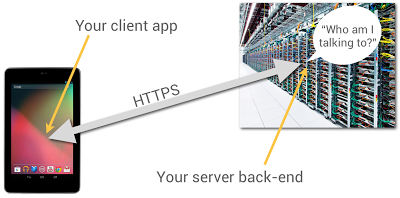
You probably have HTTP endpoints for communicating with your client apps, but how can the server-side code be sure who’s sending messages to it? After all, anyone can send HTTP POST requests from anywhere; could they impersonate your users if they could guess their identities?

It’s really user-unfriendly to ask people to type in usernames and passwords on mobile devices. In particular, if someone has installed your app and given it permission to use the Internet and know your identity, they shouldn’t be pestered any more.

It turns out that Google Play services, now available on every compatible device running Android release 2.2 or higher, offers a good solution to this problem, based on the use of Google Accounts.

Summary

Doing this is a multi-step process, which I’ll outline in full, but here’s the short version: You use the GoogleAuthUtil class, available through Google Play services, to retrieve a string called an “ID Token”. You send the token to your back end and your back end can use it to quickly and cheaply verify which app sent it and who was using the app.

This capability is built into Google facilities such as App Engine’s new Cloud Endpoints feature, which bakes app/back-end identity into a simple programming model.

Now let’s get to the details.

App Registration

You’re going to have to use the Google API Console quite a bit in this process. You’ll need to make a new project for this purpose; while you can give it a nice human-readable name and graphical branding, it turns out that those resources aren’t used in this particular scenario.

You can also authorize this project to access a large number of different Google APIs; but once again, you don’t need to in this scenario.

You should give serious thought to the people you authorize as members of the project, since these are important administrative roles.

Make Client IDs

You’ll need to make two different OAuth 2.0 “Client IDs” for your project. The first one is a “Client ID for Web applications”. Once again, you can ignore all the labeling and branding stuff, you’ll just need the Client-ID string, which will look something like 9414861317621.apps.googleusercontent.com.

Now you’ll need to make another Client ID for your Android app. To do this, you’ll need to provide two pieces of information: your app’s package name and cert signature. The package name is just the Java-style reverse-DNS, as given in the top-level “package” attribute in your AndroidManifest.xml, for example com.example.identity.

To get your app’s cert signature, use the following shell command:

$ keytool -exportcert -alias <your-key-name> -keystore <your-key-store-file> -v -list

Copy the octets labeled “SHA1”, paste them into the Developer Console field, and create your app’s Client ID. Once again, all you’ll really need from the readout is the Client-ID string.

In Your Android App

You’ll need to call the Google Play services GoogleAuthUtil class to get an ID token; the procedure is as described in Obtaining an Access Token. There’s one extra bit of magic: the value of the scope argument to the getToken(email, scope) method. It has to be the string audience:server:client_id:X, where X is the Client ID of for the Web app, as described above. If our Client ID were the example value given above, the value of the scope argument would be audience:server:client_id:9414861317621.apps.googleusercontent.com.

Magic Happens

Normally, when you ask for an OAuth token, the person using the device sees a challenge, asking them if it’s OK to use their identity to get at some resource or other. But in this case, the system looks at the server-side Client ID in your scope argument, notices that it’s in the same project as your Android app, and gives you the token without pestering the user; they’ve already agreed to a relationship with you, the developer who controls that project.

Send the Token

When you’re ready to start talking to your server back end, you need to send the token string to it. The best way to do this is in the body of an POST message; you could put it in a URL parameter, but they’re often logged. You absolutely must use an HTTPS connection, to keep any men-in-the-middle from peeking at your token.

There’s no particular reason for extra round-trips; if you’re sending a game high score to your back end, just stick the ID Token string in as an extra argument.

Use the Token

When your server receives the token from your Android app, it’s really important that you verify it. This requires two steps:

  1. Verify that it’s really signed by Google.

  2. Verify that it’s really meant for you.

Verify Signature

It turns out that this is signed using a Google public/private key pair, and Google publishes the public keys (which we change regularly) at www.googleapis.com/oauth2/v1/certs; go ahead and have a look.

You have to verify that the ID Token, which is actually a JSON Web Token, was signed with one of those certs. Fortunately, there are decent libraries around to do this; in this post, I’ll give pointers for Java, Ruby, and PHP.

The libraries can cache the Google certs and only refresh them when required, so the verification is (almost always) a fast static call.

Verify Token Fields

It turns out that the ID Token has a JSON payload, and most libraries that validate the signatures also give it to you as a hash or dictionary or whatever. Thus, you can retrieve named fields, such as aud and azp and email.

First, you have to look at the field named aud and verify that it’s identical to your Client ID, the string you included in the Android app’s scope argument. Seriously, do not omit this step; if you don't verify the ID Token, then any other developer can spoof requests to your service.

Optionally, you can look at the field named azp (stands for “authorized party”) and verify that it is identical to the Client ID of your Android app. By the way, you can have multiple different Android client apps, each with its own Client ID, in that top-level project.

Let’s assume you’ve done all three of these things. Then, you know that:

  1. The token was issued by Google.

  2. The token was sent to a device that was being operated by the person identified in the payload's email field.

You also have high confidence that:

  1. The token was obtained by the Android app identified by the Client ID in the payload’s azp field.

The Client ID only has “high confidence” because non-compatible or rooted Android devices may be able to tamper with that information. But they won't be able to fake the Google signature or the authentication of the device user to Google.

What’s Next?

That’s up to you. You know which person and app you’re talking to, it’s up to you what to do with that information.

Code Fragments

Here’s a Java class that implements an ID-Token checker using the Google Java libraries:

import java.io.IOException;
import java.security.GeneralSecurityException;

import com.google.api.client.googleapis.auth.oauth2.GoogleIdToken;
import com.google.api.client.googleapis.auth.oauth2.GoogleIdTokenVerifier;
import com.google.api.client.http.javanet.NetHttpTransport;
import com.google.api.client.json.JsonFactory;
import com.google.api.client.json.gson.GsonFactory;

public class Checker {

private final List mClientIDs;
private final String mAudience;
private final GoogleIdTokenVerifier mVerifier;
private final JsonFactory mJFactory;
private String mProblem = "Verification failed. (Time-out?)";

public Checker(String[] clientIDs, String audience) {
mClientIDs = Arrays.asList(clientIDs);
mAudience = audience;
NetHttpTransport transport = new NetHttpTransport();
mJFactory = new GsonFactory();
mVerifier = new GoogleIdTokenVerifier(transport, mJFactory);
}

public GoogleIdToken.Payload check(String tokenString) {
GoogleIdToken.Payload payload = null;
try {
GoogleIdToken token = GoogleIdToken.parse(mJFactory, tokenString);
if (mVerifier.verify(token)) {
GoogleIdToken.Payload tempPayload = token.getPayload();
if (!tempPayload.getAudience().equals(mAudience))
mProblem = "Audience mismatch";
else if (!mClientIDs.contains(tempPayload.getIssuee()))
mProblem = "Client ID mismatch";
else
payload = tempPayload;
}
} catch (GeneralSecurityException e) {
mProblem = "Security issue: " + e.getLocalizedMessage();
} catch (IOException e) {
mProblem = "Network problem: " + e.getLocalizedMessage();
}
return payload;
}

public String problem() {
return mProblem;
}
}

If you wanted to do this in Ruby, you’d want to install the google-id-token Ruby gem, and do something like this:

require 'google-id-token'
validator = GoogleIDToken::Validator.new
jwt = validator.check(token, required_audience, required_client_id)
if jwt
email = jwt['email']
else
report "Cannot validate: #{validator.problem}"
end

For PHP programmers, check out the Google APIs Client Library for PHP, in particular the function verifyIdToken in apiOAuth2.php.
New Google Maps Android API now part of Google Play services

Posted by Reto Meier, Evan Rapoport, and Andrew Foster


Google Play services is our new platform that offers you better integration with Google products, and which provides greater agility for quickly rolling out new capabilities for you to use within your apps. Today we’re launching Google Play services v2.0, which includes two new APIs, including perhaps our most frequently requested upgrade: Maps.


Google Maps Android API


The new version of the API allows developers to bring many of the recent features of Google Maps for Android to your Android apps. We’re excited to make this API available as part of Google Play services supporting devices from Froyo onwards (API level 8+).


The new API uses vector-based maps that support 2D and 3D views, and allow users to tilt and rotate the map with simple gestures. Along with the layers you’ve come to know from Google Maps such as satellite, hybrid, terrain and traffic, the new API lets you include indoor maps for many major airports and shopping centers in your app.


One of most common feature requests we’ve heard on Android is support for Map Fragments. With this new API, adding a map to your Activity is as simple as:


<fragment
android:id="@+id/map"
android:layout_width="match_parent"
android:layout_height="match_parent"
class="com.google.android.gms.maps.MapFragment" />


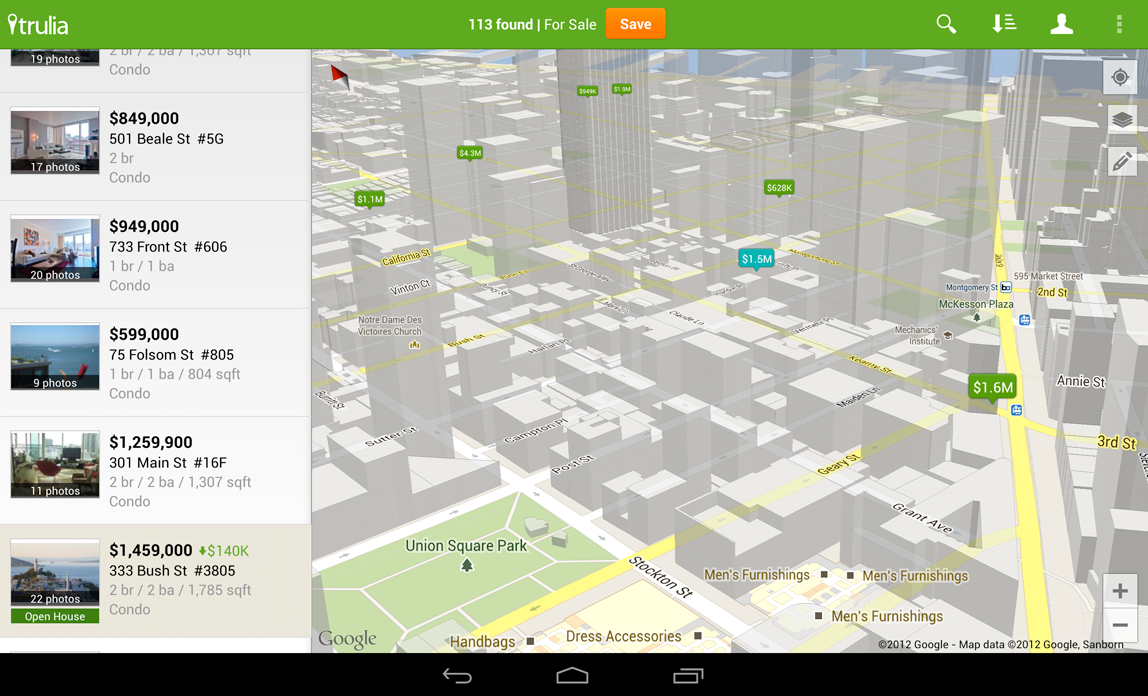
Check out this image from updated Trulia Android app (which goes live tomorrow), that users can use to search for a place to buy or rent in 3D.


The new API is simpler to use, so that creating markers and info windows is easy. Polylines, Polygons, Ground Overlays and Tile Overlays can all now be added to the map with just a few lines of code.


To get started follow the getting started instructions to obtain an API Key. Then download and configure the Google Play services SDK using the SDK Manager. Check the Google Maps for Android API documentation for more details. If you haven't got it already, you'll need to download the Android SDK first.


More than 800,000 sites around the world already use our mapping APIs to create amazing and useful apps. We hope you enjoy using this new addition to the Google Maps API family, and building mapping experiences that were never before possible on a mobile device.


Photo Sphere


In Android 4.2, we introduced Photo Sphere mode in the Camera, which you can use to create amazing, immersive panoramas just like you see in Street View on Google Maps. Today we’re excited to announce new APIs and documentation that empower developers, businesses, and photographers to explore new uses of Photo Sphere for work and for play.


We’ve made Photo Sphere an open format so anyone can create and view them on the web or on mobile devices.


A Photo sphere is simply an image file (like a JPG) that has in it text-based metadata, an open format created by Adobe called XMP. The metadata describes the Photo Sphere’s dimensions and how it should be rendered within the interactive Photo Sphere viewer you see in Android, Google+, and Google Maps.


If you’d like to programmatically or manually add the XMP metadata into panoramic images not created by the Photo Sphere camera in Android, stay tuned today for more details on the metadata and how to apply it to your photos programmatically later.


In the new Google Play services, we’ve added APIs to give you the ability to check whether an image is a Photo Sphere and then open it up in the Photo Sphere viewer.


// This listener will be called with information about the given panorama.
OnPanoramaInfoLoadedListener infoLoadedListener =
new OnPanoramaInfoLoadedListener() {
@Override
public void onPanoramaInfoLoaded(ConnectionResult result,
Intent viewerIntent) {
if (result.isSuccess()) {
// If the intent is not null, the image can be shown as a
// panorama.
if (viewerIntent != null) {
// Use the given intent to start the panorama viewer.
startActivity(viewerIntent);
}
}

// If viewerIntent is null, the image is not a viewable panorama.
}
};

// Create client instance and connect to it.
PanoramaClient client = ...
...

// Once connected to the client, initiate the asynchronous check on whether
// the image is a viewable panorama.
client.loadPanoramaInfo(infoLoadedListener, panoramaUri);

To learn more about Google Play services and the APIs available to you through it, visit the new Google Services area of the Android Developers site.

Google Play services and OAuth Identity Tools

Posted by Tim Bray

The rollout of Google Play services to all Android 2.2+ devices worldwide is now complete, and all of those devices now have new tools for working with OAuth 2.0 tokens. This is an example of the kind of agility in rolling out new platform capabilities that Google Play services provides.

Why OAuth 2.0 Matters

The Internet already has too many usernames and passwords, and they don’t scale. Furthermore, your Android device has a strong notion of who you are. In this situation, the industry consensus is that OAuth 2.0 is a good choice for the job, offering the promise of strong security minus passwords.

Google Play services make OAuth 2.0 authorization available to Android apps that want to access Google APIs, with a good user experience and security.

Typically, when you want your Android app to use a Google account to access something, you have to pick which account on the device to use, then you have to generate an OAuth 2.0 token, then you have to use it in your HTTP-based dialogue with the resource provider.

These tasks are largely automated for you if you’re using a recent release of the Google APIs Client Library for Java; the discussion here applies if you want to access the machinery directly, for example in sending your own HTTP GETs and POSTs to a RESTful interface.

Preparation

Google Play services has just started rolling out, and even after the rollout is complete, will only be available on compatible Android devices running 2.2 or later. This is the vast majority, but there will be devices out there where it’s not available. It is also possible for a user to choose to disable the software.

For these reasons, before you can start making calls, you have to verify that Google Play services is installed. To do this, call isGooglePlayServicesAvailable(). The result codes, and how to deal with them, are documented in the ConnectionResult class.

Choosing an Account

This is not, and has never been, rocket science; there are many examples online that retrieve accounts from Android’s AccountManager and display some sort of pick list. The problem is that they all have their own look and feel, and for something like this, which touches on security, that’s a problem; the user has the right to expect consistency from the system.

Now you can use the handy AccountPicker.newChooseAccountIntent() method to give you an Intent; feed it to startActivityForResult() and you’ll launch a nice standardized user experience that will return you an account (if the user feels like providing one).

Two things to note: When you’re talking to these APIs, they require a Google account (AccountManager can handle multiple flavors), so specify GoogleAuthUtil.GOOGLE_ACCOUNT_TYPE argument as the value for the allowableAccountTypes argument. Second, you don’t need an android.accounts.Account object, you just use the email-address string (available in account.name) that uniquely identifies it.

Getting a Token

There’s really only one method call you need to use, GoogleAuthUtil.getToken(). It takes three arguments: a Context, an email address, and another string argument called scope. Every information resource that is willing to talk OAuth 2.0 needs to publish which scope (or scopes) it uses. For example, to access the Google+ API, the scope is oauth2:https://www.googleapis.com/auth/plus.me. You can provide multiple space-separated scopes in one call and get a token that provides access to all of them. Code like this might be typical:

  private final static String G_PLUS_SCOPE = 
"oauth2:https://www.googleapis.com/auth/plus.me";
private final static String USERINFO_SCOPE =
"https://www.googleapis.com/auth/userinfo.profile";
private final static String SCOPES = G_PLUS_SCOPE + " " + USERINFO_SCOPE;

In an ideal world, getToken() would be synchronous, but three things keep it from being that simple:

  1. The first time an app asks for a token to access some resource, the system will need to interact with the user to make sure they’re OK with that.


  2. Any time you ask for a token, the system may well have a network conversation with the identity back-end services.


  3. The infrastructure that handles these requests may be heavily loaded and not able to get you your token right away. Rather than keeping you waiting, or just failing, it may ask you to go away and come back a little later.


The first consequence is obvious; you absolutely can’t call getToken() on the UI thread, since it’s subject to unpredictable delays.

When you call it, the following things can happen:

  • It returns a token. That means that everything went fine, the back-end thinks the authorization was successful, and you should be able to proceed and use the token.


  • It throws a UserRecoverableAuthException, which means that you need to interact with the user, most likely to ask for their approval on using their account for this purpose. The exception has a getIntent() method, whose return value you can feed to startActivityForResult() to take care of that. Of course, you’ll need to be watching for the OK in the onActivityResult() method.


  • It throws an IOException, which means that the authorization infrastructure is stressed, or there was a (not terribly uncommon on mobile devices) networking error. You shouldn’t give up instantly, because a repeat call might work. On the other hand, if you go back instantly and pester the server again, results are unlikely to be good. So you need to wait a bit; best practice would be the classic exponential-backoff pattern.


  • It throws a GoogleAuthException, which means that authorization just isn’t going to happen, and you need to let your user down politely. This can happen if an invalid scope was requested, or the account for the email address doesn’t actually exist on the device.


Here’s some sample code:

       try {
// if this returns, the OAuth framework thinks the token should be usable
String token = GoogleAuthUtil.getToken(this, mRequest.email(),
mRequest.scope());
response = doGet(token, this);

} catch (UserRecoverableAuthException userAuthEx) {
// This means that the app hasn't been authorized by the user for access
// to the scope, so we're going to have to fire off the (provided) Intent
// to arrange for that. But we only want to do this once. Multiple
// attempts probably mean the user said no.
if (!mSecondTry) {
startActivityForResult(userAuthEx.getIntent(), REQUEST_CODE);
response = null;
} else {
response = new Response(-1, null, "Multiple approval attempts");
}

} catch (IOException ioEx) {
// Something is stressed out; the auth servers are by definition
// high-traffic and you can't count on 100% success. But it would be
// bad to retry instantly, so back off
if (backoff.shouldRetry()) {
backoff.backoff();
response = authenticateAndGo(backoff);
} else {
response =
new Response(-1, null, "No response from authorization server.");
}

} catch (GoogleAuthException fatalAuthEx) {
Log.d(TAG, "Fatal Authorization Exception");
response = new Response(-1, null, "Fatal authorization exception: " +
fatalAuthEx.getLocalizedMessage());
}

This is from a sample library I’ve posted on code.google.com with an AuthorizedActivity class that implements this. We think that some of this authorization behavior is going to be app-specific, so it’s not clear that this exact AuthorizedActivity recipe is going to work for everyone; but it’s Apache2-licensed, so feel free to use any pieces that work for you. It’s set up as a library project, and there’s also a small sample app called G+ Snowflake that uses it to return some statistics about your Google+ posts; the app is in the Google Play Store and its source is online too.

Registering Your App

Most services that do OAuth 2.0 authorization want you to register your app, and Google’s are no exception. You need to visit the Google APIs Console, create a project, pick the APIs you want to access off the Services menu, and then hit the API Access tab to do the registration. It’ll want you to enter your package name; the value of the package attribute of the manifest element in your AndroidManifest.xml.

Also, it’ll want the SHA1 signature of the certificate you used to sign your app. Anyone who’s published apps to Google Play Apps knows about keystores and signing. But before you get there, you’ll be working with your debug-version apps, which are signed with a certificate living in ~/.android/debug.keystore (password: “android”). Fortunately, your computer probably already has a program called “keytool” installed; you can use this to get the signature. For your debug version, a correct incantation is:

keytool -exportcert -alias androiddebugkey -keystore ~/.android/debug.keystore -v -list

This will print out the SHA1 signature in a nicely labeled easy-to-cut-and-paste form.

This may feel a little klunky, but it’s worth it, because some magic is happening. When your app is registered and you generate a token and send it to a service provider, the provider can check with Google, which will confirm that yes, it issued that token, and give the package name of the app it was issued to. Those of you who who’ve done this sort of thing previously will be wondering about Client IDs and API Keys, but with this mechanism you don’t need them.

Using Your Token

Suppose you’ve registered your app and called GoogleAuthUtil.getToken() and received a token. For the purposes of this discussion, let’s suppose that it’s “MissassaugaParnassus42”. Then all you need to do is, when you send off an HTTP request to your service provider, include an HTTP header like so:

Authorization: Bearer MissassaugaParnassus42

Then your HTTP GETs and POSTs should Just Work. You should call GoogleAuthUtil.getToken() to get a token before each set of GETs or POSTs; it’s smart about caching things appropriately, and also about dealing with token expiry and refresh.

Once again, as I said at the top, if you’re happy using the Google APIs Client Library for Java, it’ll take care of all the client-side stuff; you’ll still need to do the developer console app registration.

Otherwise, there’s a little bit of coding investment here, but the payoff is pretty big: Secure, authenticated, authorized, service access with a good user experience.


Join the discussion on

+Android Developers