Showing posts with label Developer Preview. Show all posts

Final update to Android 7.1 Developer Preview


Posted by Dave Burke, VP of Engineering


Today we're rolling out an update to the Android 7.1 Developer Preview -- the
last before we release the final Android 7.1.1 platform to the ecosystem.
Android 7.1.1 includes the developer features already available on Pixel and
Pixel XL devices and adds optimizations and bug fixes on top of the base Android
7.1 platform. With Developer Preview 2, you can make sure your apps are ready
for Android 7.1.1 and the consumers that will soon be running it on their
devices.


As href="https://android-developers.blogspot.com/2016/10/android71-dev-preview-available.html">highlighted
in October, we're also expanding the range of devices that can receive this
Developer Preview update to Nexus 5X, Nexus 6P, Nexus 9, and Pixel C.


If you have a supported device that's enrolled in the href="http://www.android.com/beta">Android Beta Program, you'll receive an
update to Developer Preview 2 over the coming week. If you haven't enrolled your
device yet, just visit the site to
enroll your device and get the update.


In early December, we'll roll out Android 7.1.1 to the full lineup of supported
devices as well as Pixel and Pixel XL devices.


What's in this update?


Developer Preview 2 is a release candidate for Android 7.1.1 that you can use to
complete your app development and testing in preparation for the upcoming final
release. In includes near-final system behaviors and UI, along with the latest
bug fixes and optimizations across the system and Google apps.


It also includes the developer features and APIs (API level 25) already
introduced in Developer Preview 1. If you haven't explored the developer
features, you'll want to take a look at href="https://developer.android.com/preview/shortcuts.html?utm_campaign=android_launch_developerpreview_112216&utm_source=anddev&utm_medium=blog">app shortcuts,
href="https://developer.android.com/preview/api-overview.html?utm_campaign=android_launch_developerpreview_112216&utm_source=anddev&utm_medium=blog#circular-icons">round
icon resources, and href="https://developer.android.com/preview/image-keyboard.html?utm_campaign=android_launch_developerpreview_112216&utm_source=anddev&utm_medium=blog">image keyboard
support, among others -- you can see the href="https://developer.android.com/preview/api-overview.html?utm_campaign=android_launch_developerpreview_112216&utm_source=anddev&utm_medium=blog">full list of
developer features here.


With Developer Preview 2, we're also updating the SDK build and platform tools
in Android Studio, the Android 7.1.1 platform, and the API Level 25 emulator
system images. The latest version of the support library (href="https://developer.android.com/topic/libraries/support-library/revisions.html?utm_campaign=android_launch_developerpreview_112216&utm_source=anddev&utm_medium=blog">25.0.1)
is also available for you to href="https://developer.android.com/reference/android/support/v13/view/inputmethod/InputConnectionCompat.OnCommitContentListener.html?utm_campaign=android_launch_developerpreview_112216&utm_source=anddev&utm_medium=blog">add
image keyboard support, href="https://developer.android.com/reference/android/support/design/widget/BottomNavigationView.html?utm_campaign=android_launch_developerpreview_112216&utm_source=anddev&utm_medium=blog">bottom
navigation, and other features for devices running API Level 25 or earlier.


For details on API Level 25 check out the href="https://developer.android.com/sdk/api_diff/25/changes.html?utm_campaign=android_launch_npreview_061516&utm_source=anddev&utm_medium=blog">API
diffs and the updated href="https://developer.android.com/reference/packages.html?utm_campaign=android_launch_npreview_061516&utm_source=anddev&utm_medium=blog">API
reference on the href="https://developer.android.com/preview/index.html">developer preview
site.


Get your apps ready for Android 7.1


Now is the time to optimize your apps to look their best on Android 7.1.1. To
get started, update to href="https://developer.android.com/studio/index.html?utm_campaign=android_launch_npreview_061516&utm_source=anddev&utm_medium=blog">Android
Studio 2.2.2 and then download the API Level 25 platform, emulator system
images, and tools through the SDK Manager in Android Studio.


After installing the API Level 25 SDK, you can update your project's
compileSdkVersion to 25 to build and test against the new APIs. If you're doing
compatibility testing, we recommend updating your app's targetSdkVersion to 25
to test your app with compatibility behaviors disabled. For details on how to
set up your app with the API Level 25 SDK, see href="https://developer.android.com/preview/setup-sdk.html?utm_campaign=android_launch_npreview_061516&utm_source=anddev&utm_medium=blog">Set
up the Preview.


If you're adding app shortcuts or circular launcher icons to your app, you can
use Android Studio's built-in Image Asset Studio to quickly help you create
icons of different sizes that meet the href="https://material.google.com/style/icons.html#icons-product-icons">material
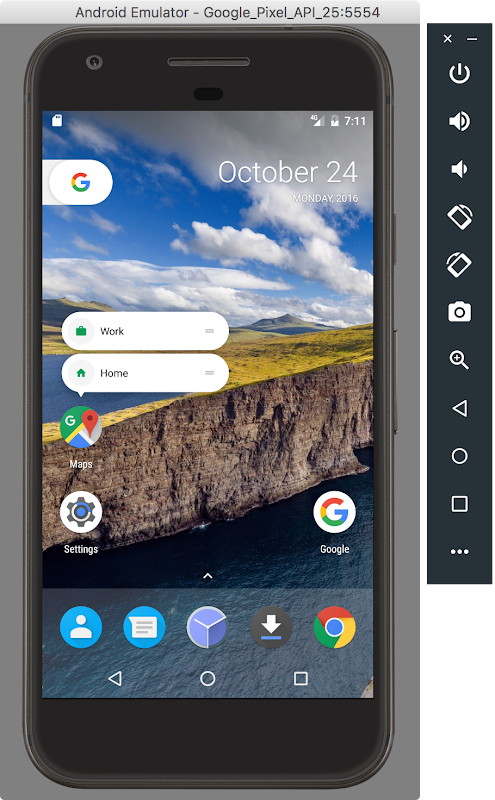
design guidelines. You can test your round icons on the Google APIs emulator
for API Level 25, which includes support for round icons and the new Google
Pixel Launcher.


Android Studio and the Google APIs emulator let you quickly create and test
your round icon assets.


If you're adding image keyboard support, you can use the Messenger and Google
Keyboard apps included in the preview system images for testing as they include
support for this new API.


Scale your tests using Firebase Test Lab for Android


To help scale your testing, make sure to take advantage of href="http://android-developers.blogspot.com/2016/11/android-dev-preview-in-firebase-test-lab.html">Firebase
Test Lab for Android and run your tests in the cloud at no charge during the
preview period on all virtual devices including the Developer Preview 2 (API
25). You can use the automated crawler (href="https://firebase.google.com/docs/test-lab/robo-ux-test">Robo Test) to
test your app without having to write any test scripts, or you can upload your
own instrumentation (e.g. Espresso) tests. You can upload your tests href="https://console.firebase.google.com/project/_/testlab/run">here.


Publish your apps to alpha, beta or production channels in Google
Play


After you've finished final testing, you can publish your updates compiled
against, and optionally targeting, API 25 to Google Play. You can publish to
your alpha, href="https://developer.android.com/distribute/engage/beta.html?utm_campaign=android_launch_npreview_061516&utm_source=anddev&utm_medium=blog">beta,
or even production channels in the Google Play Developer Console. In this way,
push your app updates to users whose devices are running Android 7.1, such as
Pixel and Android Beta devices.


Get Developer Preview 2 on Your Eligible Device


If you have an eligible device that's already enrolled in the href="https://android.com/beta">Android Beta Program, the device will get
the Developer Preview 2 update over the coming week. No action is needed on your
part. If you aren't yet enrolled in program, the easiest way to get started is
by visiting android.com/beta and opt-in
your eligible Android phone or tablet -- you'll soon receive this preview update
over-the-air. As always, you can also download and href="https://developer.android.com/preview/download.html?utm_campaign=android_launch_npreview_061516&utm_source=anddev&utm_medium=blog#flash">flash
this update manually.


As mentioned above, this Developer Preview update is available for Nexus 5X,
Nexus 6P, Nexus 9, and Pixel C devices.


We're expecting to launch the final release of the Android 7.1.1 in just a few
weeks Starting in December, we'll roll out Android 7.1.1 to the full lineup of
supported preview devices, as well as the recently launched Pixel and Pixel XL
devices. At that time, we'll also push the sources to AOSP, so our device
manufacturer partners can bring this new platform update to consumers on their
devices.


Meanwhile, we continue to welcome your feedback in the href="https://code.google.com/p/android/issues/list?can=1&q=label%3ADevPreview-N-7.1">Developer
Preview issue tracker, href="https://plus.google.com/communities/105153134372062985968/stream/755bb91d-c101-4e32-9277-1e560c4e26d2">N
Preview Developer community, or href="https://plus.google.com/communities/106765800802768335079">Android Beta
community as we work towards the final consumer release in December!


Test on Android 7.1 Developer Preview in Firebase Test Lab

By Ahmed Mounir Gad, Product Manager, Firebase Test Lab


To deliver the best user experience right out of the gate, Firebase Test Lab for Android allows you to test your apps and ensure their compatibility with multiple device configurations, across OS versions, screen orientations, and locales. With a single click, you can run your tests on hundreds of device configurations in Google Cloud and receive your results quickly.


Today, we’re excited to announce the availability of the Android 7.1 Developer Preview on Firebase Test Lab virtual devices. In addition to testing the Android 7.1 Developer Preview on your physical Android Device with the Android Beta program, or on your local Android Emulator, you can use the Firebase Test Lab to scale your app testing to hundreds of Android virtual devices.


You can also use Firebase Test Lab to perform your own testing. If you don’t have any test scripts, Robo test is ideal for doing your basic compatibility testing on the new platform. It crawls your app in an attempt to find crashes. You can also use the Espresso Test Recorder in Android Studio to record your own instrumentation tests without writing any code.


From now until the end of December (12/31/2016), Firebase Test Lab will be offered at no charge on the Firebase Blaze plan for all virtual devices, to help you ensure the compatibility of your app with the Android 7.1 Developer Preview release, as well as with other Android releases.


Prepare your app for API level 25, then go to the Firebase Test Lab console to run your first test.


Happy testing!


Robo tests uncovering a crash on Android 7.1 Developer Preview for the Flood-It! app.


Now available: Android 7.1 Developer Preview


Posted by Dave Burke, VP of Engineering


A couple of weeks ago we announced that a developer preview of Android 7.1 Nougat was on the way. You can get started with this new release today by downloading the SDK and tools. To get the 7.1 release on your eligible device, enroll your device in the Android Beta program. If your device is already enrolled, you'll receive the update automatically.


What’s in the Developer Preview?


The Android 7.1 Developer Preview gives you everything you need to test your app on the new platform or extend it with new features like app shortcuts and image keyboard support. It includes an updated SDK and tools, documentation and samples, as well as emulators and device system images for running your apps on supported devices.


We’re continuing the model we used in N and earlier releases, and with Android 7.1 being an incremental release there are a few differences to highlight:


  • Since 7.1 has already launched on Pixel, we’re delivering the initial Developer Preview at beta quality for the Nexus lineup of devices. The goal is to tease out any device-specific issues.

  • We’ve finalized the new APIs as API Level 25

  • We’ve opened up publishing on Google Play for apps targeting the new API level, so you can update your apps soon as you are ready.


After the initial preview release, we plan to deliver an update in November followed by the final public release to the Android Open Source Project (AOSP) in December. Initially available on Nexus 5X, Nexus 6P, and Pixel C devices, we’ll extend the Developer Preview to other devices in November.


Get your apps ready for Android 7.1


To get started, update to Android Studio 2.2.2 and download API Level 25 platform, emulator system images and tools. The final API Level 25 SDK is available for download through the SDK Manager in Android Studio.


Once you’ve installed the API Level 25 SDK, you can update your project’s compileSdkVersion to 25 to build and test against the new APIs. If you’re doing compatibility testing, we recommend updating your app’s targetSdkVersion to 25 to test your app with compatibility behaviors disabled. For details on how to set up your app with the API Level 25 SDK, see Set up the Preview.


If you’re adding app shortcuts or circular launcher icons to your app, you can use Android Studio’s built-in Image Asset Studio to quickly help you create icons of different sizes that meet the material design guidelines.


The Google APIs Emulator System images shipped with the Android API Level 25 SDK include support for round icons and the new Google Pixel Launcher. The Google API system image allows you to test how your app’s circular app icons look in devices that support circular icons. Also, if you are developing live wallpapers, you can also use the the new system images with the Android Emulator to test the enhanced preview metadata in Android 7.1.


To help you add image keyboard support, you can use the Messenger and Google Keyboard apps included in the preview system images for testing as they include support for this new API.


Along with the API Level 25 SDK, we have also updated the Android Support Library to 25.0.0. The new version lets you add image keyboard support with compatibility back to API level 13. It also introduces BottomNavigationView widget, which implements the bottom navigation pattern from the material design guidelines.


For details on API Level 25 check out the API diffs and the updated API reference on the developer preview site.


Image keyboard support on Nexus 6P

You can use the Android Emulator in Android Studio to test your circular app icons & shortcuts in a launcher


App shortcuts on Nexus 6P

You can use the Image Asset tool to quickly create circular icon assets.


Publish your apps to alpha, beta or production channels in Google Play


Since the Android 7.1 APIs are final, you can publish updates compiling with, and optionally targeting, API 25 to Google Play. You can now publish app updates that use API 25 to your alpha, beta, or even production channels in the Google Play Developer Console. In this way, push your app updates to users whose devices are running Android 7.1, such as Pixel and Android Beta devices.

How to Get Android 7.1 Developer Preview on Your Eligible Device


If you are already enrolled in the Android Beta program, then your eligible enrolled devices will get the Android 7.1 Developer Preview update right away, no action is needed on your part. If you aren’t yet enrolled in Android Beta, the easiest way to get started is to visit android.com/beta and opt-in your eligible Android phone or tablet -- you’ll soon receive this (and later) preview updates over-the-air. If you have an enrolled device and do not want to receive the update, just visit Android Beta and unenroll the device. You can also download and flash this update manually.


We welcome your feedback in the Developer Preview issue tracker, N Preview Developer community, or Android Beta community as we work towards the consumer release in December!


Coming soon: Android 7.1 Developer Preview


Posted by Dave Burke, VP of Engineering


Today, we’re taking the wraps off of Android 7.1 Nougat, the latest version of the platform. You probably saw a sneak peek of it at last week’s event. It’s an incremental update based on Android 7.0 but includes new features for consumers and developers — from platform Daydream VR support and A/B system updates to app shortcuts and image keyboard support.


We’ve already been working closely with device makers to get them ready for Android 7.1, and next we’ll give you access to this update so you can start getting your apps ready.


Later this month we’ll be bringing you the Android 7.1 platform as an open Developer Preview, similar to what we did for Android 7.0. You’ll be able to test and build on the new platform and try the latest features.


As always, we’ll deliver the Developer Preview through the Android Beta program, which makes it incredibly easy to participate.


What’s in Android 7.1?


Android 7.1 delivers the productivity, security, and performance of Android 7.0, along with a variety of optimizations and bug fixes, features, and new APIs (API level 25).


For developers, Android 7.1 adds new capabilities to help you drive engagement in your app and deliver an improved user experience, such as:


  • App shortcuts API — lets you surface key actions directly in the launcher and take your users deep into your app instantly. You can create up to 5 shortcuts, either statically or dynamically.

  • Circular app icons support — lets you provide great-looking rounded icon resources that match the look of Pixel and other launchers.

  • Enhanced live wallpaper metadata — lets you provide metadata about your live wallpapers to any picker displaying the wallpapers as a preview. You can show existing metadata such as label, description, and author, as well as a new context URL and title to link to more information.


Android 7.1 also adds these much-requested developer features to the platform:


  • Image keyboard support — expands the types of content that users can enter from their keyboards, letting them express themselves through custom stickers, animated gifs, and more. Apps can tell the keyboard what types of content they accept, and keyboards can deliver all of the images and other content that they offer to the user. For broad compatibility, this API will also be available in the support library.

  • Storage manager Intent — lets an app take the user directly to a new Settings screen to clear unused files and free up storage space on the device.


For carriers and calling apps, the platform includes new APIs to support multi-endpoint calling and new telephony configuration options.


Image keyboard support on Nexus 6P

Image keyboard support: Let users input images and other content directly from a keyboard.


App shortcuts on Nexus 6P

App shortcuts: Use app shortcuts to surface key actions and take users deep into your app instantly.


Get your apps ready


Android 7.1 is an incremental release, but it’s always important to make sure your apps look and run great — especially as devices start to reach consumers.


The Android 7.1 Developer Preview will give you everything you need to test your apps or extend them with new features like shortcuts or keyboard images. Included are the SDK with new APIs, build tools, documentation and samples, as well as emulators and device system images for running your apps on supported Nexus devices. We’ll also include a launcher and apps that support app shortcuts, and a keyboard and apps that support keyboard images.


If you want to receive the Developer Preview automatically, visit Android Beta and enroll your device. If you previously enrolled a device and haven’t unenrolled, your device will receive the update. If you already enrolled but don’t want to receive the update, visit Android Beta to unenroll the device as soon as possible.


Initially, we’ll offer the Developer Preview for Nexus 5X, Nexus 6P, and Pixel C devices, extending to other supported devices by the end of the preview. At the final release of the Android 7.1.x platform, due in early December, we’ll roll out updates to the full lineup of supported devices — Nexus 6, 5X, 6P, 9, Player, Pixel C, and supported Android One devices — as well as Pixel and Pixel XL devices.


Coming to consumer devices soon


We’re working with our partners to bring Android 7.1 to devices in the ecosystem over the months ahead, so we recommend downloading the Android 7.1 Developer Preview as soon as it’s available. Test your apps for compatibility and optimize them to look their best, such as by providing circular app icons and adding app shortcuts.


Meanwhile, stay tuned, we’ll be sharing more details about the Developer Preview soon!