Showing posts with label Games. Show all posts

Your next growth market: Realizing the potential of MENA


Posted by Mohammad El-Saadi, BD, Google Play


We know that many developers want to take advantage of growth opportunities in
new regions, but are held back by not knowing the most important areas to focus
on. That's why we wanted to share stories from our partners in the Middle East
and North Africa (MENA). It's a fast growing region for Google Play, and one
that already represents a sizable revenue opportunity. They've shared their
experiences, and some key things to focus on if you're thinking of launching in
the region.


Middle East and North Africa overview


MENA is a diverse region in terms of disposable income, access to connectivity,
and smartphone penetration. However, it is possible to broadly group MENA into
two types of market:


Growth markets


  • Examples: Saudi Arabia, United Arab Emirates (UAE), Kuwait and the rest of
    the Gulf Cooperation Council (GCC).
  • Very high smartphone penetration (on par with top western european markets),
  • Large disposable income
  • Robust growth in spend on mobile apps and games


Emerging markets


  • Examples: Morocco, Egypt and Iraq.
  • Large populations
  • Significant growth in smartphone (primarily Android) adoption.


Opportunities


Localization


If you want to be successful in MENA, localization is key. In Saudi Arabia 19 of
the top 20 grossing apps & games have their Google Play Store listing localized
and the majority of those have their actual app/game localized as well. By
localizing to Arabic, mobile app and game developers have found great success in
the region.


When Singapore-based href="https://play.google.com/store/apps/details?id=com.wego.android">Wego.com
localized to Arabic, they achieved over 200% YoY growth in
MENA
, grew their app rating from 3.5 to over 4.5 among Arab travelers
and increased Arab users' retention rates by 200%. Today, MENA represents over
65% of their users.


To do localization well, here are a few things to consider:


  • Localize your store listing into Arabic including your video, screenshots
    and text. If you are targeting specific countries within MENA consider using
    local dialects, otherwise use formal Arabic. Consider using Store Listing
    Experiments to optimize your listing for local audiences.
  • If applicable, flip your app/game UI to be right-to-left.
  • Beware of common issues when localizing to Arabic: Arabic letters appearing
    disjointed or showing up in reverse order and the ordering of words getting
    mixed up when sentences contain both Latin and Arabic words
  • Localize pricing by showing appropriate local currency and rounding. Note
    that different countries in MENA have different currencies and
    affordability/willingness to pay.
  • Plan around major local events such as the holy month of Ramadan, when after
    fasting from dawn to sunset, families and loved ones gather for meals, laughs
    and stories. We've found that during this month usage of apps and games
    increases significantly in MENA.
  • Provide local customer support
  • Be culturally sensitive in your communication and content - avoid
    stereotypes and keep in mind the relatively conservative nature of users in the
    region
  • Leverage the power of YouTube to reach your audiences in MENA. Saudi Arabia
    for instance is the second largest market for YouTube globally in terms of views
    per capita.


Refer to our href="https://developer.android.com/distribute/tools/localization-checklist.html?utm_campaign=android_discussion_mena_112116&utm_source=anddev&utm_medium=blog">Localization
Checklist for some best practices when localizing for any language.


Gaming


Gaming is a high growth and revenue opportunity in MENA. Most countries in the
region have a median age of 30 or lower, smartphone growth will continue to grow
at double digits, which makes gaming a key segment for users in the region.
Today's local top grossing charts and dominated by Midcore strategy games.
Interestingly, GCC countries have some of the highest Average Revenue Per Paying
User rates globally.


International titles, including Clash of Clans, Clash Royale, Mobile Strike and
Clash of Kings, have performed incredibly well in the region. In addition,
titles specifically targeting MENA have also seen tremendous success. href="https://play.google.com/store/apps/dev?id=7006382305291329295">Revenge of
the Sultans, by ONEMT, from China, has been the top grossing title across
several MENA countries for many months. Similarly, when IGG.com launched the
Arabic version of Castle Clash, they grew revenue from MENA by
58%
within 4 months.


As the market evolves, there is also a huge opportunity for other genres (such
as RPG, FPS, and sports) which are not present at scale in the region yet.


Google Play in MENA


We continue to invest in making sure that users are able to pay for their
favorite apps and games by launching locally relevant payment methods in MENA.
Today, we have carrier billing available with the major networks in Saudi
Arabia, UAE and Kuwait. We plan to expand coverage in more countries, including
Qatar and Bahrain, in the future.


We are also committed to increasing the quality and availability of Arabic apps
and games for MENA users, which is why we launched our href="https://play.google.com/store/recommended?sp=CAEwAFovCilwcm9tb3Rpb25fMzAwMjUxMl9BcHBzX01FTkFfTm93X0luX0FyYWJpYxAHGAM%3D:S:ANO1ljLJ7kY&c=apps">Now
in Arabic href="https://play.google.com/store/recommended?sp=CAEwAFovCilwcm9tb3Rpb25fMzAwMjUxMl9BcHBzX01FTkFfTm93X0luX0FyYWJpYxAHGAM%3D:S:ANO1ljLJ7kY&c=apps">cohref="https://play.google.com/store/recommended?sp=CAEwAFovCilwcm9tb3Rpb25fMzAwMjUxMl9BcHBzX01FTkFfTm93X0luX0FyYWJpYxAHGAM%3D:S:ANO1ljLJ7kY&c=apps">llhref="https://play.google.com/store/recommended?sp=CAEwAFovCilwcm9tb3Rpb25fMzAwMjUxMl9BcHBzX01FTkFfTm93X0luX0FyYWJpYxAHGAM%3D:S:ANO1ljLJ7kY&c=apps">echref="https://play.google.com/store/recommended?sp=CAEwAFovCilwcm9tb3Rpb25fMzAwMjUxMl9BcHBzX01FTkFfTm93X0luX0FyYWJpYxAHGAM%3D:S:ANO1ljLJ7kY&c=apps">tihref="https://play.google.com/store/recommended?sp=CAEwAFovCilwcm9tb3Rpb25fMzAwMjUxMl9BcHBzX01FTkFfTm93X0luX0FyYWJpYxAHGAM%3D:S:ANO1ljLJ7kY&c=apps">onhref="https://play.google.com/store/recommended?sp=CAEwAFovCilwcm9tb3Rpb25fMzAwMjUxMl9BcHBzX01FTkFfTm93X0luX0FyYWJpYxAHGAM%3D:S:ANO1ljLJ7kY&c=apps">
featuring apps and games that have recently localized to Arabic. This
collection will be regularly updated. If you're interested in being included, href="https://docs.google.com/a/google.com/forms/d/e/1FAIpQLSfuqUnnrY4a9XUsKlqrfow_7v9p1jMX_ae7DLnshk30pqOVZQ/viewform">submit
your localized app/game.


Calling European game developers, enter the Indie Games Contest by December 31

Originally posted on Google Developers blog


Posted by Matteo Vallone, Google Play Games Business Development


To build awareness of the awesome innovation and art that indie game developers
are bringing to users on Google Play, we have invested heavily over the past
year in programs like href="https://play.google.com/store/info/topic?id=topic_b000054_games_indie_corner_tp&e=-EnableAppDetailsPageRedesign">Indie
Corner, as well as events like the Google Play Indie Games Festivalshref="https://events.withgoogle.com/google-play-indie-game-festival/"> in
North
America
and href="https://events.withgoogle.com/google-play-indie-games-fes/">Korea.


As part of that sustained effort, we also want to celebrate the passion and
innovation of indie game developers with the introduction of the first-ever
href="https://events.withgoogle.com/indie-games-contest-europe/">Google Play
Indie Games Contest
in Europe. The contest will recognize the best
indie talent in several countries and offer prizes that will help you get your
game noticed by industry experts and gamers worldwide.


Prizes for the finalists and winners:


  • An open showcase held at the Saatchi Gallery in London
  • YouTube influencer campaigns worth up to 100,000 EUR
  • Premium placements on Google Play
  • Tickets to Google I/O 2017 and other top industry events
  • Promotions on our channels
  • Special prizes for the best Unity game
  • And href="https://events.withgoogle.com/indie-games-contest-europe/prizes/">more!


Entering the contest:


If you're based in Czech Republic, Denmark, Finland, France (coming soon),
Germany, Iceland, Israel, Netherlands, Norway, Poland (coming soon), Romania,
Spain, Sweden, Turkey, or UK (excl. Northern Ireland), have 15 or less full time
employees, and published a new game on Google Play after 1 January 2016, you may
now be eligible to href="https://events.withgoogle.com/indie-games-contest-europe/">enter the
contest. If you're planning on publishing a new game soon, you can also
enter by submitting a private beta. Check out all the details in the href="https://events.withgoogle.com/indie-games-contest-europe/terms/">terms and
conditions. Submissions close on 31 December 2016.


The process:


Up to 20 finalists will get to showcase their games at an open event at the
Saatchi Gallery in London on the 16th February 2017. At the event, the top 10
will be selected by the event attendees and the Google Play team. The top 10
will then get the opportunity to pitch to a jury of industry experts, from which
the final winner and runners up will be selected.


Even if someone is NOT entering the contest:


Even if you're not eligible to enter the contest, you can still register to
attend the final showcase event in London on 16 February 2017, check out some
great indie games, and have fun with various industry experts and indie
developers. We will also be hosting a workshop for all indie games developers
from across EMEA in the new Google office in Kings Cross the next day, so this
will be a packed week.


Get started:


href="https://events.withgoogle.com/indie-games-contest-europe/">Enter the Indie
Games Contest now
and visit the href="https://events.withgoogle.com/indie-games-contest-europe/">contest
site to find out more about the contest, the event, and the workshop.


Android Developer Story: Papumba grows revenue globally by localising its family titles on Google Play

Posted by Lily Sheringham, Google Play team


Papumba is an educational games developer based in Argentina, with a core team of four people and a vision to grow a global business.


Watch Gonzalo Rodriguez, CEO, and Andres Ballone, CFO, explain how working with a team of experts from across the world and adapting their games to local markets helped them find success globally.


Learn more about localized pricing and translation services to grow your app or game business globally on Google Play. Also, get the Playbook for Developers app to stay up-to-date on new features and learn best practices that will help you grow a successful business on Google Play.


Announcing the winners of the Google Play Indie Games Festival in San Francisco; Indie Games Contest coming soon to Europe


Posted by Jamil Moledina, Google Play, Games Strategic Lead


Last Saturday, we hosted the first href="https://events.withgoogle.com/google-play-indie-game-festival/exhibiting-games/">Google
Play Indie Games Festival in North America, where we showcased 30 amazing
games that celebrate the passion, innovation, and art of indies. After a
competitive round of voting from fans and on-stage presentations to a jury of
industry experts, we recognized seven finalists nominees and three winners.


Winners:


Presented by Greg Batha


Bit Bit Blocks is a cute and action-packed competitive puzzle game. Play with your friends on a single screen, or challenge yourself in single player mode. Head-to-head puzzle play anytime, anywhere.


Presented by Kaveh Daryabeygi, Wombo Combo


Numbo Jumbo is a casual mobile puzzle number game for iOS and Android. Players group numbers that add together: for example, [3, 5, 8] works because 3+5=8.


Presented by Chetan Surpur & Eric Rahman, Highkey Games


ORBIT puts a gravity simulator at the heart of a puzzle game. Launch planets with a flick of your finger, and try to get them into orbit around black holes. ORBIT also features a sandbox where you can create your own universes, control time, and paint with gravity.


Finalist nominees:


Antihero [coming later in 2016]


Presented by Tim Conkling


Antihero is a "fast-paced strategy game with an (Oliver) Twist." Run a thieves' guild in a gas-lit, corrupt city. Recruit urchins, hire thugs, steal everything – and bribe, blackmail, and assassinate your opposition. Single-player and cross-platform multiplayer for desktops, tablets, and phones.


Armajet [coming later in 2016]


Presented by Nicola Geretti & Alexander Krivicich, Super Bit Machine


Armajet is a free-to-play multiplayer shooter that pits teams of players against each other in fast-paced jetpack combat. Armajet is a best in class mobile game designed for spectator-friendly competitive gaming for tablets and smartphones. Players compete in a modern arena shooter that’s easy to learn, but hard to master.


Norman's Night In: The Cave [coming later in 2016]


Presented by Nick Iorfino & Alex Reed, Bactrian Games


Norman's Night In is a 2D puzzle-platformer that tells the tale of Norman and his fateful fall into the world of cave. While test driving the latest model 3c Bowling Ball, Norman finds himself lost with nothing but his loaned bball and a weird feeling that somehow he was meant to be there.


Presented by David Fox, Double Coconut


Parallyzed is an atmospheric adventure platformer with unique gameplay, set in a dark and enchanting dreamscape. You play twin sisters who have been cast into separate dimensions. Red and Blue have different attributes and talents, are deeply connected, and have the ability to swap bodies at any time.


Finalists nominees and winners also received a range of prizes, including Google
I/O 2017 tickets, a Tango Development kit, Google Cloud credits, an NVIDIA
Android TV & K1 tablet, and a Razer Forge TV bundle.


Indie Games Contest coming to Europe


We’re continuing our effort to help indie game developers thrive by highlighting
innovative and fun games for fans around the world. Today, we are announcing the
Indie Games Contest for developers based in European countries (specific list of
countries coming soon!). This is a great opportunity for indie games developers
to win prizes that will help you showcase your art to industry experts and grow
your business and your community of players worldwide. Make sure you don’t miss
out on hearing the details by shref="https://events.withgoogle.com/indie-games-contest-europe/">igning up
here for updates.


As we shared at the festival, it’s rewarding to see how Google Play has evolved
over the years. We’re now reaching over 1 billion users every month and there’s
literally something for everyone. From virtual reality to family indie games,
developers like you continue to inspire, provoke, and innovate through
beautiful, artistic games.


Google Developer Day at GDC

Day 2 of Game Developers Conference 2014 is getting underway and today Google is hosting a special Developer Day at Moscone Center in San Francisco.


Join us at the sessions


Building on yesterday’s announcements for game developers, we'll be presenting a series of sessions that walk you through the new features, services, and tools, explaining how they work and what they can bring to your games.


We'll also be talking with you about how to reach and engage with hundreds of millions of users on Google Play, build Games that scale in the cloud, grow in-game advertising businesses with AdMob, track revenue with Google Analytics, as well as explore new gaming frontiers, like Glass.


If you’re at the conference, the Google Developer Day sessions are a great opportunity to meet the developer advocates, engineers, and product managers of the Google products that drive users, engagement and retention for your games. If you’re remote, we invite you to sit-in on the sessions by joining the livestream below or on Google Developers channel on YouTube.


The Developer Day sessions (and livestream) kick off at 10:00AM PDT (5:00PM UTC). A complete agenda is available on the GDC Developer Day page.


LiquidFun 1.0


Last December we announced the initial release of LiquidFun, a C++ library that adds particle physics, including realistic fluid dynamics, to the open-source Box2D.


To get Google Developer Day started, we’re releasing LiquidFun 1.0, an update that adds multiple particle systems, new particle behaviors, and other new features.


Check out the video below to see what Liquid Fun 1.0 can do, visit the LiquidFun home page, or join today's LiquidFun session at Google Developer Day to learn how LiquidFun works and how to use particle physics in your games. The session starts at 4:35PM PDT (11:35PM UTC).


Google Play services 4.3

gps

Google Play services 4.3 has now been rolled out to the world, and it contains a number of features you can use to improve your apps. Specifically, this version adds some new members to the Google Play services family: Google Analytics API, Tag Manager, and the Address API. We’ve also made some great enhancements to the existing APIs; everything to make sure you stay on top of the app game out there.


Here are the highlights of the 4.3 release.


Google Analytics and Google Tag Manager

The Analytics API and Google Tag Manager has existed for Android for some time as standalone technologies, but with this release we are incorporating them as first class citizens in Google Play services. Those of you that are used to the API will find it very similar to previous versions, and if you have not used it before we strongly encourage you to take a look at it.

Google Analytics allows you to get detailed statistics on how you app is being used by your users, for example what functionality of your app is being used the most, or which activity triggers users to convert from an advertised version of an app to paid one. Google Tag Manager lets you change characteristics of your app on-the-fly, for example colors, without having to push an update from Google Play.


Google Play Games services Update

The furious speed of innovation in Android mobile gaming has not slowed down and neither have we when it comes to packing the Google Play Game services API with features.

With this release, we are introducing game gifts, which allows players to send virtual in-game requests to anyone in their Google+ circles or through player search. Using this feature, the player can send a 'wish' request to ask another player for an in-game item or benefit, or a 'gift' request to grant an item or benefit to another player.

This is a great way for a game to be more engaging by increasing cross player collaboration and social connections. We are therefore glad to add this functionality as an inherent part of the Games API, it is an much-wanted extension to the multi-player functionality included a couple of releases ago. For more information, see: Unlocking the power of Google for your games.


Drive API

The Google Drive for Android API was just recently added as a member of the Google Play services API family. This release adds a number of important features:

  • Pinning - You can now pin files that should be kept up to date locally, ensuring that it is available when the user is offline. This is great for users that need to use your app with limited or no connectivity


  • App Folders - An app often needs to create files which are not visible to the user, for example to store temporary files in a photo editor. This can now be done using App Folders, a feature is analogous to Application Data Folders in the Google Drive API


  • Change Notifications - You can now register a callback to receive notifications when a file or folder is changed. This mean you no longer need to query Drive continuously to check if the data has changed, just put a change notification on it


In addition to the above, we've also added the ability to access a number of new metadata fields.


Address API

This release will also includes a new Address API, which allows developers to request access to addresses for example to fill out a delivery address form. The kicker is the convenience for the user; a user interface component is presented where they select the desired address, and bang, the entire form is filled out. Developers have been relying on Location data which works very well, but this API shall cater for cases where the Location data is either not accurate or the user actually wants to use a different address than their current physical location. This should sound great to anyone who has done any online shopping during the last decade or so.


That’s it for this time. Now go to work and incorporate these new features to make your apps even better!

And stay tuned for future updates.


For the release video, please see:

DevBytes: Google Play Services 4.3


For details on the APIs, please see:

Google Analytics

Google Tag Manager

Google Play Games services Gifts

Google Drive Android API - Change Events

Google Drive Android API - Pinning

Google Drive Android API - App Folder

Address API


Unlocking the Power of Google for Your Games, at GDC

By Greg Hartrell, Google Play Games team


Today, everyone is a gamer — in fact, 3 in every 4 Android users are playing games, allowing developers to reach an unprecedented audience of players in an Android ecosystem that’s activated over one billion devices. This has helped Google Play Games — Google’s cross-platform game service and SDK for Android, iOS and the web (which lets you easily integrate features like achievements, leaderboards, multiplayer and cloud save into your games) — grow at tremendous speed. The momentum continues on Google Play, where four times more money was paid out to developers in 2013 than in 2012.


With the Game Developers Conference (GDC) this week, we announced a number of new features for Google Play Games and other Google products. As they launch over the coming weeks, these new services and tools will help you unlock the power of Google to take your games to the next level.


Power your game and get discovered


With game gifts, players in your games can send virtual in-game objects to anyone in their circles or through multiplayer search.


To help players get the most out of your games, Play Games will be expanding engagement and discovery options.


We'll be introducing game gifts, a new service that lets players send virtual in-game objects to anyone in their circles or through player search. The Play Games app now supports multiplayer invites directly, further helping players discover your game and keep them playing. And the Google Play Store will also feature 18 new game categories, making it easier for players to find games they'll love.


Tools to take your game to the next level


Further enhancing Google Play Game services, we're expanding multiplayer to support iOS, bringing turn-based and real-time multiplayer capabilities to both Android and iOS.


To further help with cross platform game development, we're updating our Play Games Unity Plug-in to support cross-platform multiplayer services, and introducing an early Play Games C++ SDK to support achievements and leaderboards.


In addition, we're launching enhanced Play Games statistics on the Google Play Developer Console, providing easy game analytics for Play Games adopters. Developers will gain a daily dashboard that visualizes player and engagement statistics for signed in users, including daily active users, retention analysis and achievement, and leaderboard performance.


Ad features to better optimize your business


Of course, once you build a great gaming experience, it's important to get rewarded for your work, which is why we'll also be introducing new features to the AdMob platform. We're making Google Analytics available directly in the AdMob interface, so you can gain deeper insights into how users are interacting with your app. Turning those insights into effective action is vital, so we're excited by the opportunities that in-app purchase ads will offer — enabling you to target users with specific promotions to buy items in your game. Advertising continues to be a core vehicle driving many game developers' success, so we're also bringing you new ways to optimize your ads to earn the most revenue.


Watch the Google Sessions at GDC


Check out the stream from our Google Developer Day sessions at GDC 2014. Learn more about how to reach and engage with hundreds of millions of users on Google Play, build Games that scale in the cloud, grow in-game advertising businesses with AdMob, track revenue with Google Analytics, as well as explore new gaming frontiers, like Glass.


New Tools to Take Your Games to the Next Level


In this mobile world, games aren't just for the hardcore MMOG fan anymore, they're for everyone; in fact, three out of four people with an Android phone or tablet play games. If you're a game developer, Google has a host of tools available for you to help take your game to the next level, including Google Play game services, which let's you leverage Google's strength in mobile and cloud services so you can focus on building compelling game experiences for your users. Today, we're adding more tools to your gaming toolbox, like the open sourcing of a 2D physics library, as well as new features to the Google Play game services offering, like a plug-in for Unity.


LiquidFun, a rigid-body physics library with fluid simulation


First, we are announcing the open-source release of LiquidFun, a new C++ 2D physics library that makes it easier for developers to add realistic physics to their games.


Based on Box2D, LiquidFun features particle-based fluid simulation. Game developers can use it for new game mechanics and add realistic physics to game play. Designers can use the library to create beautiful fluid interactive experiences.


The video clip below shows a circular body falling into a viscous fluid using LiquidFun.


The LiquidFun library is written in C++, so any platform that has a C++ compiler can benefit from it. To help with this, we have provided a method to build the LiquidFun library, example applications, and unit tests for Android, Linux, OSX and Windows.


We’re looking forward to seeing what you’ll do with LiquidFun and we want to hear from you about how we can make this even better! Download the latest release from our LiquidFun project page on GitHub and join our discussion list!


Google Play Games plug-in for Unity


If you are a game developer using Unity, the cross-platform game engine from Unity Technologies, you can now more easily integrate game services using a new Google Play Games plug-in for Unity. This initial version of the plug-in supports sign-in, achievements, leaderboards and cloud save on Android and iOS. You can download the plug-in from the Play Games project page on GitHub, along with documentation and sample code.


New categories for games in Google Play


New game categories are coming to the Play Store in February 2014, such as Simulation, Role Playing, and Educational! Developers can now use the Google Play Developer Console to choose a new category for their apps if the Application Type is “Games”. The New Category field in the Store Listing will set the future category for your game. This will not change the category of your game on Google Play until the new categories go live in February 2014.


New Developer Features in Google Play Games

Posted by Greg Hartrell, Google Play Games team


Mobile games are on fire right now; in fact, three out of every four Android users are playing games. Earlier in the year we launched Google Play Games — Google’s platform for gaming across Android, iOS, and the web — to help you take advantage of this wave of users. Building on Google Play Services, you can quickly add new social features to your games, for richer game experiences that drive user acquisition and engagement across platforms.


Today we’re announcing three new features in Google Play Games that make it easier to understand what players are doing in your game, manage your game features more effectively, and store more game data in the Google cloud.


Game services statistics in the Developer Console


Now you can see stats about your game’s player activity in Google Play Games right in the Google Play Developer Console. You can see how many players have signed into your game through Google, the percentage of players who unlocked an achievement, and how many scores are posted to your leaderboards.


Game services alerts in the Developer Console


Did you mangle the ID for an achievement or leaderboard? Forget to hit the publish button? Do you know if your game is getting throttled because you accidentally called a method in a tight loop? Fear not! New alerts will now show up in the Developer Console to warn you when these mistakes happen, and guide you quickly to the answers on how to fix them.


Double your Cloud Save storage


Cloud Save is one of our most popular features for game developers, providing up to 512KB of data per user, per game, since it was introduced. You asked for more storage, and we are delivering on that request. Starting October 14th, 2013, you’ll be able to store up to 256KB per slot, for a total of 1MB per user. Game saves have never been happier!


More about Google Play Games


If you want learn more about what Google Play Games offers and how to get started, take a look at the Google Play Games Services developer documentation.

Using the Hardware Scaler for Performance and Efficiency

Posted by Hak Matsuda and Dirk Dougherty, Android Developer Relations team


If you develop a performance-intensive 3D game, you’re always looking for ways to give users richer graphics, higher frame rates, and better responsiveness. You also want to conserve the user’s battery and keep the device from getting too warm during play. To help you optimize in all of these areas, consider taking advantage of the hardware scaler that’s available on almost all Android devices in the market today.


How it works and why you should use it


Virtually all modern Android devices use a CPU/GPU chipset that includes a hardware video scaler. Android provides the higher-level integration and makes the scaler available to apps through standard Android APIs, from Java or native (C++) code. To take advantage of the hardware scaler, all you have to do is render to a fixed-size graphics buffer, rather than using the system-provided default buffers, which are sized to the device's full screen resolution.


When you render to a fixed-size buffer, the device hardware does the work of scaling your scene up (or down) to match the device's screen resolution, including making any adjustments to aspect ratio. Typically, you would create a fixed-size buffer that's smaller than the device's full screen resolution, which lets you render more efficiently — especially on today's high-resolution screens.


Using the hardware scaler is more efficient for several reasons. First, hardware scalers are extremely fast and can produce great visual results through multi-tap and other algorithms that reduce artifacts. Second, because your app is rendering to a smaller buffer, the computation load on the GPU is reduced and performance improves. Third, with less computation work to do, the GPU runs cooler and uses less battery. And finally, you can choose what size rendering buffer you want to use, and that buffer can be the same on all devices, regardless of the actual screen resolution.


Optimizing the fill rate


In a mobile GPU, the pixel fill rate is one of the major sources of performance bottlenecks for performance game applications. With newer phones and tablets offering higher and higher screen resolutions, rendering your 2D or 3D graphics on those those devices can significantly reduce your frame rate. The GPU hits its maximum fill rate, and with so many pixels to fill, your frame rate drops.


style="border-radius: 6px;padding:0;margin:0;" />
Power consumed in the GPU at different rendering resolutions, across several popular chipsets in use on Android devices. (Data provided by Qualcomm).


To avoid these bottlenecks, you need to reduce the number of pixels that your game is drawing in each frame. There are several techniques for achieving that, such as using depth-prepass optimizations and others, but a really simple and effective way is making use of the hardware scaler.


Instead of rendering to a full-size buffer that could be as large as 2560x1600, your game can instead render to a smaller buffer — for example 1280x720 or 1920x1080 — and let the hardware scaler expand your scene without any additional cost and minimal loss in visual quality.


Reducing power consumption and thermal effects


A performance-intensive game can tend to consume too much battery and generate too much heat. The game’s power consumption and thermal conditions are important to users, and they are important considerations to developers as well.


As shown in the diagram, the power consumed in the device GPU increases significantly as rendering resolution rises. In most cases, any heavy use of power in GPU will end up reducing battery life in the device.


In addition, as CPU/GPU rendering load increases, heat is generated that can make the device uncomfortable to hold. The heat can even trigger CPU/GPU speed adjustments designed to cool the CPU/GPU, and these in turn can throttle the processing power that’s available to your game.


For both minimizing power consumption and thermal effects, using the hardware scaler can be very useful. Because you are rendering to a smaller buffer, the GPU spends less energy rendering and generates less heat.


Accessing the hardware scaler from Android APIs


Android gives you easy access to the hardware scaler through standard APIs, available from your Java code or from your native (C++) code through the Android NDK.


All you need to do is use the APIs to create a fixed-size buffer and render into it. You don’t need to consider the actual size of the device screen, however in cases where you want to preserve the original aspect ratio, you can either match the aspect ratio of the buffer to that of the screen, or you can adjust your rendering into the buffer.


From your Java code, you access the scaler through SurfaceView, introduced in API level 1. Here’s how you would create a fixed-size buffer at 1280x720 resolution:


surfaceView = new GLSurfaceView(this);
surfaceView.getHolder().setFixedSize(1280, 720);


If you want to use the scaler from native code, you can do so through the NativeActivity class, introduced in Android 2.3 (API level 9). Here’s how you would create a fixed-size buffer at 1280x720 resolution using NativeActivity:


int32_t ret = ANativeWindow_setBuffersGeometry(window, 1280, 720, 0);


By specifying a size for the buffer, the hardware scaler is enabled and you benefit in your rendering to the specified window.


Choosing a size for your graphics buffer


If you will use a fixed-size graphics buffer, it's important to choose a size that balances visual quality across targeted devices with performance and efficiency gains.


For most performance 3D games that use the hardware scaler, the recommended size for rendering is 1080p. As illustrated in the diagram, 1080p is a sweet spot that balances a visual quality, frame rate, and power consumption. If you are satisfied with 720p, of course you can use that size for even more efficient operations.


More information


If you’d like to take advantage of the hardware scaler in your app, take a look at the class documentation for SurfaceView or NativeActivity, depending on whether you are rendering through the Android framework or native APIs.

Watch for sample code on using the hardware scaler coming soon!

Respecting Audio Focus


Posted by Kristan Uccello, Google Developer Relations


It’s rude to talk during a presentation, it disrespects the speaker and annoys the audience. If your application doesn’t respect the rules of audio focus then it’s disrespecting other applications and annoying the user. If you have never heard of audio focus you should take a look at the Android developer training material.

With multiple apps potentially playing audio it's important to think about how they should interact. To avoid every music app playing at the same time, Android uses audio focus to moderate audio playback—your app should only play audio when it holds audio focus. This post provides some tips on how to handle changes in audio focus properly, to ensure the best possible experience for the user.


Requesting audio focus


Audio focus should not be requested when your application starts (don’t get greedy), instead delay requesting it until your application is about to do something with an audio stream. By requesting audio focus through the AudioManager system service, an application can use one of the AUDIOFOCUS_GAIN* constants (see Table 1) to indicate the desired level of focus.


Listing 1. Requesting audio focus.


1. AudioManager am = (AudioManager) mContext.getSystemService(Context.AUDIO_SERVICE);
2.
3. int result = am.requestAudioFocus(mOnAudioFocusChangeListener,
4. // Hint: the music stream.
5. AudioManager.STREAM_MUSIC,
6. // Request permanent focus.
7. AudioManager.AUDIOFOCUS_GAIN);
8. if (result == AudioManager.AUDIOFOCUS_REQUEST_GRANTED) {
9. mState.audioFocusGranted = true;
10. } else if (result == AudioManager.AUDIOFOCUS_REQUEST_FAILED) {
11. mState.audioFocusGranted = false;
12. }


In line 7 above, you can see that we have requested permanent audio focus. An application could instead request transient focus using AUDIOFOCUS_GAIN_TRANSIENT which is appropriate when using the audio system for less than 45 seconds.


Alternatively, the app could use AUDIOFOCUS_GAIN_TRANSIENT_MAY_DUCK, which is appropriate when the use of the audio system may be shared with another application that is currently playing audio (e.g. for playing a "keep it up" prompt in a fitness application and expecting background music to duck during the prompt). The app requesting AUDIOFOCUS_GAIN_TRANSIENT_MAY_DUCK should not use the audio system for more than 15 seconds before releasing focus.


Handling audio focus changes


In order to handle audio focus change events, an application should create an instance of OnAudioFocusChangeListener. In the listener, the application will need to handle theAUDIOFOCUS_GAIN* event and AUDIOFOCUS_LOSS* events (see Table 1). It should be noted that AUDIOFOCUS_GAIN has some nuances which are highlighted in Listing 2, below.


Listing 2. Handling audio focus changes.


1. mOnAudioFocusChangeListener = new AudioManager.OnAudioFocusChangeListener() {  
2.
3. @Override
4. public void onAudioFocusChange(int focusChange) {
5. switch (focusChange) {
6. case AudioManager.AUDIOFOCUS_GAIN:
7. mState.audioFocusGranted = true;
8.
9. if(mState.released) {
10. initializeMediaPlayer();
11. }
12.
13. switch(mState.lastKnownAudioFocusState) {
14. case UNKNOWN:
15. if(mState.state == PlayState.PLAY && !mPlayer.isPlaying()) {
16. mPlayer.start();
17. }
18. break;
19. case AudioManager.AUDIOFOCUS_LOSS_TRANSIENT:
20. if(mState.wasPlayingWhenTransientLoss) {
21. mPlayer.start();
22. }
23. break;
24. case AudioManager.AUDIOFOCUS_LOSS_TRANSIENT_CAN_DUCK:
25. restoreVolume();
26. break;
27. }
28.
29. break;
30. case AudioManager.AUDIOFOCUS_LOSS:
31. mState.userInitiatedState = false;
32. mState.audioFocusGranted = false;
33. teardown();
34. break;
35. case AudioManager.AUDIOFOCUS_LOSS_TRANSIENT:
36. mState.userInitiatedState = false;
37. mState.audioFocusGranted = false;
38. mState.wasPlayingWhenTransientLoss = mPlayer.isPlaying();
39. mPlayer.pause();
40. break;
41. case AudioManager.AUDIOFOCUS_LOSS_TRANSIENT_CAN_DUCK:
42. mState.userInitiatedState = false;
43. mState.audioFocusGranted = false;
44. lowerVolume();
45. break;
46. }
47. mState.lastKnownAudioFocusState = focusChange;
48. }
49.};


AUDIOFOCUS_GAIN is used in two distinct scopes of an applications code. First, it can be used when registering for audio focus as shown in Listing 1. This does NOT translate to an event for the registered OnAudioFocusChangeListener, meaning that on a successful audio focus request the listener will NOT receive an AUDIOFOCUS_GAIN event for the registration.


AUDIOFOCUS_GAIN is also used in the implementation of an OnAudioFocusChangeListener as an event condition. As stated above, the AUDIOFOCUS_GAIN event will not be triggered on audio focus requests. Instead the AUDIOFOCUS_GAIN event will occur only after an AUDIOFOCUS_LOSS* event has occurred. This is the only constant in the set shown Table 1 that is used in both scopes.


There are four cases that need to be handled by the focus change listener. When the application receives an AUDIOFOCUS_LOSS this usually means it will not be getting its focus back. In this case the app should release assets associated with the audio system and stop playback. As an example, imagine a user is playing music using an app and then launches a game which takes audio focus away from the music app. There is no predictable time for when the user will exit the game. More likely, the user will navigate to the home launcher (leaving the game in the background) and launch yet another application or return to the music app causing a resume which would then request audio focus again.


However another case exists that warrants some discussion. There is a difference between losing audio focus permanently (as described above) and temporarily. When an application receives an AUDIOFOCUS_LOSS_TRANSIENT, the behavior of the app should be that it suspends its use of the audio system until it receives an AUDIOFOCUS_GAIN event. When the AUDIOFOCUS_LOSS_TRANSIENT occurs, the application should make a note that the loss is temporary, that way on audio focus gain it can reason about what the correct behavior should be (see lines 13-27 of Listing 2).


Sometimes an app loses audio focus (receives an AUDIOFOCUS_LOSS) and the interrupting application terminates or otherwise abandons audio focus. In this case the last application that had audio focus may receive an AUDIOFOCUS_GAIN event. On the subsequent AUDIOFOCUS_GAIN event the app should check and see if it is receiving the gain after a temporary loss and can thus resume use of the audio system or if recovering from an permanent loss, setup for playback.


If an application will only be using the audio capabilities for a short time (less than 45 seconds), it should use an AUDIOFOCUS_GAIN_TRANSIENT focus request and abandon focus after it has completed its playback or capture. Audio focus is handled as a stack on the system — as such the last process to request audio focus wins.


When audio focus has been gained this is the appropriate time to create a MediaPlayer or MediaRecorder instance and allocate resources. Likewise when an app receives AUDIOFOCUS_LOSS it is good practice to clean up any resources allocated. Gaining audio focus has three possibilities that also correspond to the three audio focus loss cases in Table 1. It is a good practice to always explicitly handle all the loss cases in the OnAudioFocusChangeListener.


Table 1. Audio focus gain and loss implication.


GAINLOSS
AUDIOFOCUS_GAINAUDIOFOCUS_LOSS
AUDIOFOCUS_GAIN_TRANSIENTAUDIOFOCUS_LOSS_TRANSIENT
AUDIOFOCUS_GAIN_TRANSIENT_MAY_DUCKAUDIOFOCUS_LOSS_TRANSIENT_CAN_DUCK


Note: AUDIOFOCUS_GAIN is used in two places. When requesting audio focus it is passed in as a hint to the AudioManager and it is used as an event case in the OnAudioFocusChangeListener. The gain events highlighted in green are only used when requesting audio focus. The loss events are only used in the OnAudioFocusChangeListener.


Table 2. Audio stream types.


Stream TypeDescription
STREAM_ALARMThe audio stream for alarms
STREAM_DTMFThe audio stream for DTMF Tones
STREAM_MUSICThe audio stream for "media" (music, podcast, videos) playback
STREAM_NOTIFICATIONThe audio stream for notifications
STREAM_RINGThe audio stream for the phone ring
STREAM_SYSTEMThe audio stream for system sounds


An app will request audio focus (see an example in the sample source code linked below) from the AudioManager (Listing 1, line 1). The three arguments it provides are an audio focus change listener object (optional), a hint as to what audio channel to use (Table 2, most apps should use STREAM_MUSIC) and the type of audio focus from Table 1, column 1. If audio focus is granted by the system (AUDIOFOCUS_REQUEST_GRANTED), only then handle any initialization (see Listing 1, line 9).


Note: The system will not grant audio focus (AUDIOFOCUS_REQUEST_FAILED) if there is a phone call currently in process and the application will not receive AUDIOFOCUS_GAIN after the call ends.


Within an implementation of OnAudioFocusChange(), understanding what to do when an application receives an onAudioFocusChange() event is summarized in Table 3.


In the cases of losing audio focus be sure to check that the loss is in fact final. If the app receives an AUDIOFOCUS_LOSS_TRANSIENT or AUDIOFOCUS_LOSS_TRANSIENT_CAN_DUCK it can hold onto the media resources it has created (don’t call release()) as there will likely be another audio focus change event very soon thereafter. The app should take note that it has received a transient loss using some sort of state flag or simple state machine.


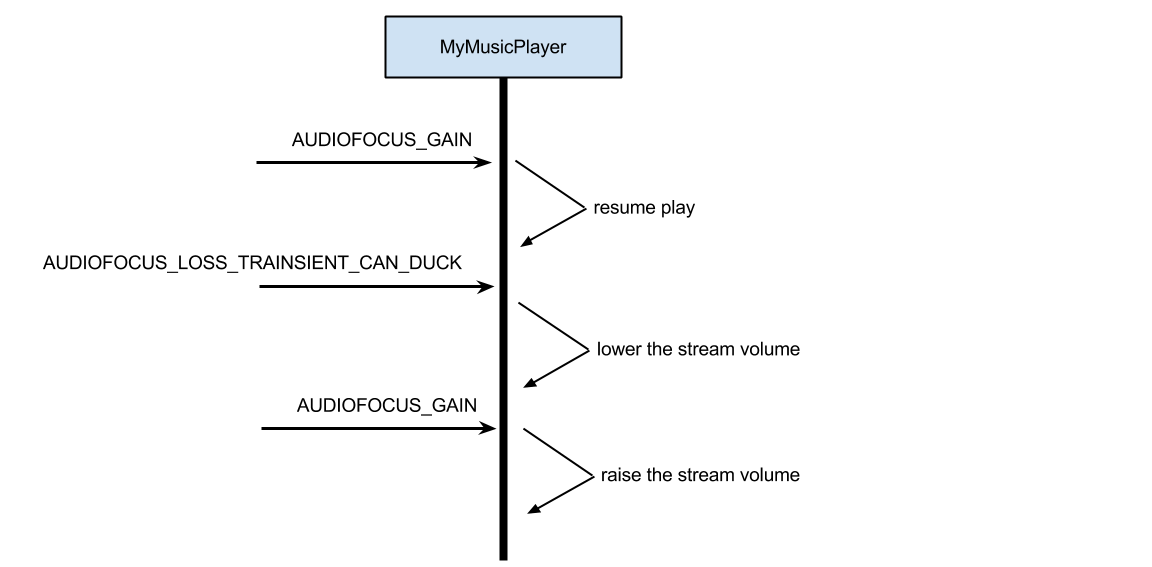
If an application were to request permanent audio focus with AUDIOFOCUS_GAIN and then receive an AUDIOFOCUS_LOSS_TRANSIENT_CAN_DUCK an appropriate action for the application would be to lower its stream volume (make sure to store the original volume state somewhere) and then raise the volume upon receiving an AUDIOFOCUS_GAIN event (see Figure 1, below).


Table 3. Appropriate actions by focus change type.


Focus Change TypeAppropriate Action
AUDIOFOCUS_GAINGain event after loss event: Resume playback of media unless other state flags set by the application indicate otherwise. For example, the user paused the media prior to loss event.
AUDIOFOCUS_LOSSStop playback. Release assets.
AUDIOFOCUS_LOSS_TRANSIENTPause playback and keep a state flag that the loss is transient so that when the AUDIOFOCUS_GAIN event occurs you can resume playback if appropriate. Do not release assets.
AUDIOFOCUS_LOSS_TRANSIENT_CAN_DUCKLower volume or pause playback keeping track of state as with AUDIOFOCUS_LOSS_TRANSIENT. Do not release assets.


Conclusion and further reading


Understanding how to be a good audio citizen application on an Android device means respecting the system's audio focus rules and handling each case appropriately. Try to make your application behave in a consistent manner and not negatively surprise the user. There is a lot more that can be talked about within the audio system on Android and in the material below you will find some additional discussions.


Example source code is available here:


https://android.googlesource.com/platform/development/+/master/samples/RandomMusicPlayer