Showing posts with label Android code sample: AsyncTask. Show all posts

Run multi AsyncTask at the same time

AsyncTask enables proper and easy use of the UI thread. This class allows to perform background operations and publish results on the UI thread without having to manipulate threads and/or handlers.

When first introduced, AsyncTasks were executed serially on a single background thread. Starting with DONUT, this was changed to a pool of threads allowing multiple tasks to operate in parallel. Starting with HONEYCOMB, tasks are executed on a single thread to avoid common application errors caused by parallel execution.

If you truly want parallel execution, you can invoke executeOnExecutor(java.util.concurrent.Executor, Object[]) with THREAD_POOL_EXECUTOR.

~ reference: AsyncTask | Android Developers


This example show how to execute multi AsyncTask at the same in parallel, by calling executeOnExecutor(AsyncTask.THREAD_POOL_EXECUTOR) for (Build.VERSION.SDK_INT >= Build.VERSION_CODES.HONEYCOMB), in our StartAsyncTaskInParallel() method. The first three ProgressBars updated by AsyncTask execute in normal approach by calling execute(), the last two ProgressBar updated by AsyncTask execute in parallel.


MainActivity.java
package com.example.androidparallelasynctask;

import android.view.View;
import android.view.View.OnClickListener;
import android.widget.Button;
import android.widget.ProgressBar;
import android.annotation.TargetApi;
import android.app.Activity;
import android.os.AsyncTask;
import android.os.Build;
import android.os.Bundle;
import android.os.SystemClock;

public class MainActivity extends Activity {

public class MyAsyncTask extends AsyncTask<Void, Integer, Void> {

ProgressBar myProgressBar;

public MyAsyncTask(ProgressBar target) {
myProgressBar = target;
}

@Override
protected Void doInBackground(Void... params) {
for(int i=0; i<100; i++){
publishProgress(i);
SystemClock.sleep(100);
}
return null;
}

@Override
protected void onProgressUpdate(Integer... values) {
myProgressBar.setProgress(values[0]);
}

}

Button buttonStart;
ProgressBar progressBar1, progressBar2, progressBar3, progressBar4, progressBar5;
MyAsyncTask asyncTask1, asyncTask2, asyncTask3, asyncTask4, asyncTask5;

@Override
protected void onCreate(Bundle savedInstanceState) {
super.onCreate(savedInstanceState);
setContentView(R.layout.activity_main);
progressBar1 = (ProgressBar)findViewById(R.id.progressbar1);
progressBar2 = (ProgressBar)findViewById(R.id.progressbar2);
progressBar3 = (ProgressBar)findViewById(R.id.progressbar3);
progressBar4 = (ProgressBar)findViewById(R.id.progressbar4);
progressBar5 = (ProgressBar)findViewById(R.id.progressbar5);

buttonStart = (Button)findViewById(R.id.start);
buttonStart.setOnClickListener(new OnClickListener(){

@Override
public void onClick(View v) {
asyncTask1 = new MyAsyncTask(progressBar1);
asyncTask1.execute();
asyncTask2 = new MyAsyncTask(progressBar2);
asyncTask2.execute();
asyncTask3 = new MyAsyncTask(progressBar3);
asyncTask3.execute();
asyncTask4 = new MyAsyncTask(progressBar4);
StartAsyncTaskInParallel(asyncTask4);
asyncTask5 = new MyAsyncTask(progressBar5);
StartAsyncTaskInParallel(asyncTask5);
}});

}

@TargetApi(Build.VERSION_CODES.HONEYCOMB)
private void StartAsyncTaskInParallel(MyAsyncTask task) {
if(Build.VERSION.SDK_INT >= Build.VERSION_CODES.HONEYCOMB)
task.executeOnExecutor(AsyncTask.THREAD_POOL_EXECUTOR);
else
task.execute();
}

}

activity_main.xml
<LinearLayout xmlns:android="http://schemas.android.com/apk/res/android"
xmlns:tools="http://schemas.android.com/tools"
android:layout_width="match_parent"
android:layout_height="match_parent"
android:paddingBottom="@dimen/activity_vertical_margin"
android:paddingLeft="@dimen/activity_horizontal_margin"
android:paddingRight="@dimen/activity_horizontal_margin"
android:paddingTop="@dimen/activity_vertical_margin"
android:orientation="vertical"
tools:context="com.example.androidparallelasynctask.MainActivity" >

<TextView
android:layout_width="wrap_content"
android:layout_height="wrap_content"
android:layout_gravity="center_horizontal"
android:autoLink="web"
android:text="http://arteluzevida.blogspot.com/"
android:textStyle="bold" />

<Button
android:id="@+id/start"
android:layout_width="fill_parent"
android:layout_height="wrap_content"
android:text="Start"/>

<ProgressBar
android:id="@+id/progressbar1"
style="?android:attr/progressBarStyleHorizontal"
android:layout_width="fill_parent"
android:layout_height="wrap_content"
android:max="100"
android:progress="0" />
<ProgressBar
android:id="@+id/progressbar2"
style="?android:attr/progressBarStyleHorizontal"
android:layout_width="fill_parent"
android:layout_height="wrap_content"
android:max="100"
android:progress="0" />
<ProgressBar
android:id="@+id/progressbar3"
style="?android:attr/progressBarStyleHorizontal"
android:layout_width="fill_parent"
android:layout_height="wrap_content"
android:max="100"
android:progress="0" />
<ProgressBar
android:id="@+id/progressbar4"
style="?android:attr/progressBarStyleHorizontal"
android:layout_width="fill_parent"
android:layout_height="wrap_content"
android:max="100"
android:progress="0" />
<ProgressBar
android:id="@+id/progressbar5"
style="?android:attr/progressBarStyleHorizontal"
android:layout_width="fill_parent"
android:layout_height="wrap_content"
android:max="100"
android:progress="0" />

</LinearLayout>

This video show how it run on devices running various Android version, include:
- Nexus 7 (1st generation), Android 4.4.2
- HTC One X, Android 4.2.2
- HTC Flyer, Android 3.2.1
- Nexus One, Android 2.3.6


download filesDownload the files.

GridView example: load images to GridView from SD Card in background

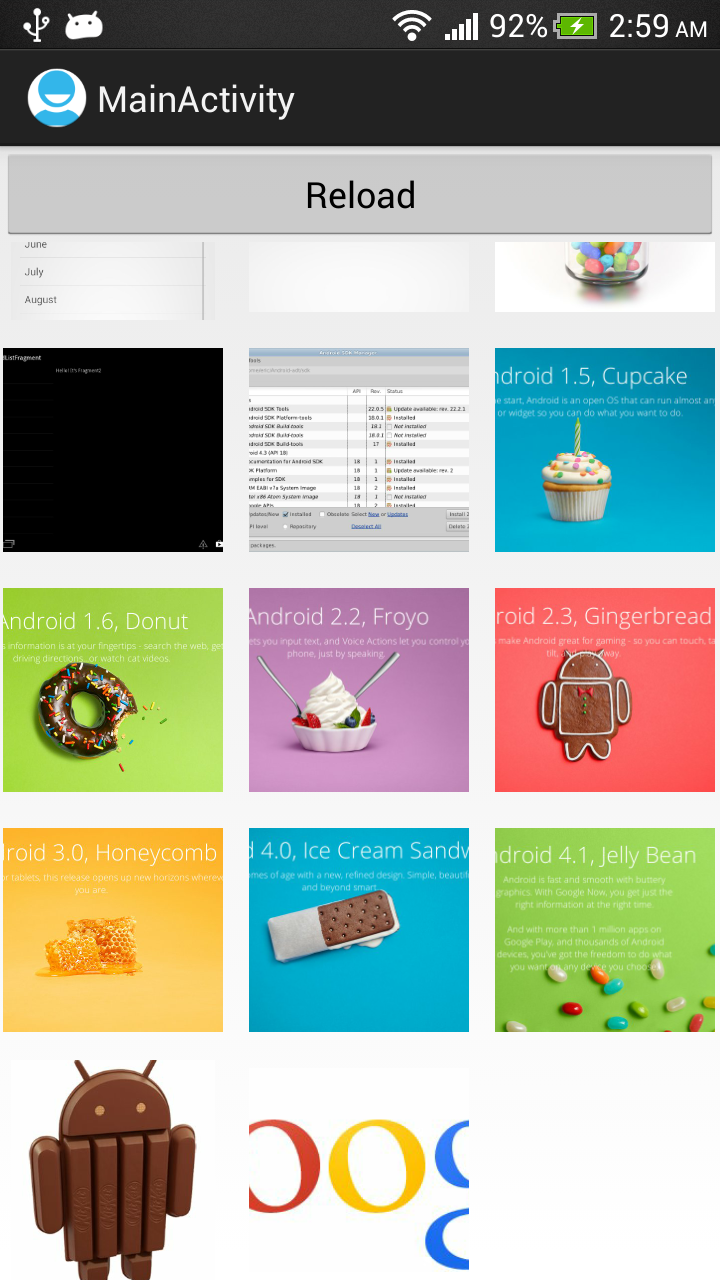
Recall from the "old exercise of GridView", loading images to GridView from SD Card in onCreate() method running in main thread. Actually, it may take long time to finish, so it should be moved to background thread. This exercise move the file loading operation to AsyncTask running in background thread.

Also introduce Reload button to demonstrate how to clear and reload the list.

Load images to GridView from SD Card


Here are some notes in my implementation:
  • In my trial experience, should not access ImageAdapter(extends BaseAdapter) from background thread such as doInBackground(). Doing so will conflict with ImageAdapter's getView() method, and generate IndexOutOfBoundsException occasionally. It whould be accessed in UI thread, so the clear(), add() and notifyDataSetChanged() have been moved to onPreExecute(), onProgressUpdate() and onPostExecute().
  • Cancel the AsyncTask if not need.
  • In my approach, always new another ImageAdapter when reloading; to prevent the list inside mixed with a invalid but still running AsyncTask.

package com.example.androidgridview;

import java.io.File;
import java.util.ArrayList;

import android.os.AsyncTask;
import android.os.Bundle;
import android.os.Environment;
import android.app.Activity;
import android.content.Context;
import android.graphics.Bitmap;
import android.graphics.BitmapFactory;
import android.view.View;
import android.view.View.OnClickListener;
import android.view.ViewGroup;
import android.widget.AdapterView;
import android.widget.AdapterView.OnItemClickListener;
import android.widget.BaseAdapter;
import android.widget.Button;
import android.widget.GridView;
import android.widget.ImageView;
import android.widget.Toast;

public class MainActivity extends Activity {

AsyncTaskLoadFiles myAsyncTaskLoadFiles;

public class AsyncTaskLoadFiles extends AsyncTask<Void, String, Void> {

File targetDirector;
ImageAdapter myTaskAdapter;

public AsyncTaskLoadFiles(ImageAdapter adapter) {
myTaskAdapter = adapter;
}

@Override
protected void onPreExecute() {
String ExternalStorageDirectoryPath = Environment
.getExternalStorageDirectory().getAbsolutePath();

String targetPath = ExternalStorageDirectoryPath + "/test/";
targetDirector = new File(targetPath);
myTaskAdapter.clear();

super.onPreExecute();
}

@Override
protected Void doInBackground(Void... params) {

File[] files = targetDirector.listFiles();
for (File file : files) {
publishProgress(file.getAbsolutePath());
if (isCancelled()) break;
}
return null;
}

@Override
protected void onProgressUpdate(String... values) {
myTaskAdapter.add(values[0]);
super.onProgressUpdate(values);
}

@Override
protected void onPostExecute(Void result) {
myTaskAdapter.notifyDataSetChanged();
super.onPostExecute(result);
}

}

public class ImageAdapter extends BaseAdapter {

private Context mContext;
ArrayList<String> itemList = new ArrayList<String>();

public ImageAdapter(Context c) {
mContext = c;
}

void add(String path) {
itemList.add(path);
}

void clear() {
itemList.clear();
}

void remove(int index){
itemList.remove(index);
}

@Override
public int getCount() {
return itemList.size();
}

@Override
public Object getItem(int position) {
// TODO Auto-generated method stub
return itemList.get(position);
}

@Override
public long getItemId(int position) {
// TODO Auto-generated method stub
return 0;
}

@Override
public View getView(int position, View convertView, ViewGroup parent) {
ImageView imageView;
if (convertView == null) { // if it's not recycled, initialize some
// attributes
imageView = new ImageView(mContext);
imageView.setLayoutParams(new GridView.LayoutParams(220, 220));
imageView.setScaleType(ImageView.ScaleType.CENTER_CROP);
imageView.setPadding(8, 8, 8, 8);
} else {
imageView = (ImageView) convertView;
}

Bitmap bm = decodeSampledBitmapFromUri(itemList.get(position), 220,
220);

imageView.setImageBitmap(bm);
return imageView;
}

public Bitmap decodeSampledBitmapFromUri(String path, int reqWidth,
int reqHeight) {

Bitmap bm = null;
// First decode with inJustDecodeBounds=true to check dimensions
final BitmapFactory.Options options = new BitmapFactory.Options();
options.inJustDecodeBounds = true;
BitmapFactory.decodeFile(path, options);

// Calculate inSampleSize
options.inSampleSize = calculateInSampleSize(options, reqWidth,
reqHeight);

// Decode bitmap with inSampleSize set
options.inJustDecodeBounds = false;
bm = BitmapFactory.decodeFile(path, options);

return bm;
}

public int calculateInSampleSize(

BitmapFactory.Options options, int reqWidth, int reqHeight) {
// Raw height and width of image
final int height = options.outHeight;
final int width = options.outWidth;
int inSampleSize = 1;

if (height > reqHeight || width > reqWidth) {
if (width > height) {
inSampleSize = Math.round((float) height
/ (float) reqHeight);
} else {
inSampleSize = Math.round((float) width / (float) reqWidth);
}
}

return inSampleSize;
}

}

ImageAdapter myImageAdapter;

@Override
public void onCreate(Bundle savedInstanceState) {
super.onCreate(savedInstanceState);
setContentView(R.layout.activity_main);

final GridView gridview = (GridView) findViewById(R.id.gridview);
myImageAdapter = new ImageAdapter(this);
gridview.setAdapter(myImageAdapter);

/*
* Move to asyncTaskLoadFiles String ExternalStorageDirectoryPath =
* Environment .getExternalStorageDirectory() .getAbsolutePath();
*
* String targetPath = ExternalStorageDirectoryPath + "/test/";
*
* Toast.makeText(getApplicationContext(), targetPath,
* Toast.LENGTH_LONG).show(); File targetDirector = new
* File(targetPath);
*
* File[] files = targetDirector.listFiles(); for (File file : files){
* myImageAdapter.add(file.getAbsolutePath()); }
*/
myAsyncTaskLoadFiles = new AsyncTaskLoadFiles(myImageAdapter);
myAsyncTaskLoadFiles.execute();

gridview.setOnItemClickListener(myOnItemClickListener);

Button buttonReload = (Button)findViewById(R.id.reload);
buttonReload.setOnClickListener(new OnClickListener(){

@Override
public void onClick(View arg0) {

//Cancel the previous running task, if exist.
myAsyncTaskLoadFiles.cancel(true);

//new another ImageAdapter, to prevent the adapter have
//mixed files
myImageAdapter = new ImageAdapter(MainActivity.this);
gridview.setAdapter(myImageAdapter);
myAsyncTaskLoadFiles = new AsyncTaskLoadFiles(myImageAdapter);
myAsyncTaskLoadFiles.execute();
}});

}

OnItemClickListener myOnItemClickListener = new OnItemClickListener() {

@Override
public void onItemClick(AdapterView<?> parent, View view, int position,
long id) {
String prompt = "remove " + (String) parent.getItemAtPosition(position);
Toast.makeText(getApplicationContext(), prompt, Toast.LENGTH_SHORT)
.show();

myImageAdapter.remove(position);
myImageAdapter.notifyDataSetChanged();

}
};

}


<LinearLayout xmlns:android="http://schemas.android.com/apk/res/android"
xmlns:tools="http://schemas.android.com/tools"
android:layout_width="match_parent"
android:layout_height="match_parent"
android:orientation="vertical">

<Button
android:id="@+id/reload"
android:layout_width="match_parent"
android:layout_height="wrap_content"
android:text="Reload"/>
<GridView
android:id="@+id/gridview"
android:layout_width="fill_parent"
android:layout_height="fill_parent"
android:columnWidth="90dp"
android:numColumns="auto_fit"
android:verticalSpacing="10dp"
android:horizontalSpacing="10dp"
android:stretchMode="columnWidth"
android:gravity="center"/>

</LinearLayout>


download filesDownload the files.

download filesDownload and try the APK.

Implement callback function with interface

This example demonstrate how to implement callback function with interface.

Implement callback function with interface

Create a MyAsyncTask class extends AsyncTask. Inside MyAsyncTask, interface DoSomething declared. MyAsyncTask class handle the background timing only, know knowing about the actual jobs. The actual jobs are in the class implement DoSomething.

package com.example.androidcallback;

import android.os.AsyncTask;
import android.os.SystemClock;

public class MyAsyncTask extends AsyncTask<Void, Void, Void> {

interface DoSomething {
void doInBackground(int progress);
void doPostExecute();
}

DoSomething myDoSomethingCallBack;
int myMax;

MyAsyncTask(DoSomething callback, int max){
myDoSomethingCallBack = callback;
myMax = max;
}

@Override
protected Void doInBackground(Void... params) {
for (int i = 0; i <= myMax; i++) {
SystemClock.sleep(100);
myDoSomethingCallBack.doInBackground(i);
}
return null;
}

@Override
protected void onPostExecute(Void result) {
super.onPostExecute(result);
myDoSomethingCallBack.doPostExecute();
}

}


MainActivity.java, implements DoSomething. Itself (this) will be passed to MyAsyncTask constructor, to implement callback function.
package com.example.androidcallback;

import com.example.androidcallback.MyAsyncTask.DoSomething;

import android.os.Bundle;
import android.widget.ProgressBar;
import android.widget.Toast;
import android.app.Activity;

public class MainActivity extends Activity implements DoSomething{

ProgressBar myProgressBar;
MyAsyncTask myAsyncTask;
int myProgress;

@Override
protected void onCreate(Bundle savedInstanceState) {
super.onCreate(savedInstanceState);
setContentView(R.layout.activity_main);

myProgressBar = (ProgressBar)findViewById(R.id.myprogressbar);

myProgress = 0;
myAsyncTask = new MyAsyncTask(this, 100);
myAsyncTask.execute();
}

@Override
public void doInBackground(int i) {
myProgressBar.setProgress(i);
}

@Override
public void doPostExecute() {
Toast.makeText(MainActivity.this,
"Finish", Toast.LENGTH_LONG).show();
}

}


layout
<LinearLayout xmlns:android="http://schemas.android.com/apk/res/android"
xmlns:tools="http://schemas.android.com/tools"
android:layout_width="match_parent"
android:layout_height="match_parent"
android:paddingBottom="@dimen/activity_vertical_margin"
android:paddingLeft="@dimen/activity_horizontal_margin"
android:paddingRight="@dimen/activity_horizontal_margin"
android:paddingTop="@dimen/activity_vertical_margin"
android:orientation="vertical"
tools:context=".MainActivity" >

<TextView
android:layout_width="wrap_content"
android:layout_height="wrap_content"
android:layout_gravity="center_horizontal"
android:autoLink="web"
android:text="http://arteluzevida.blogspot.com/"
android:textStyle="bold" />

<ProgressBar
android:id="@+id/myprogressbar"
android:layout_width="match_parent"
android:layout_height="wrap_content"
style="?android:attr/progressBarStyleHorizontal"
android:max="100"
android:progress="0" />

</LinearLayout>


download filesDownload the files.