Showing posts with label Android. Show all posts

Final update to Android 7.1 Developer Preview


Posted by Dave Burke, VP of Engineering


Today we're rolling out an update to the Android 7.1 Developer Preview -- the
last before we release the final Android 7.1.1 platform to the ecosystem.
Android 7.1.1 includes the developer features already available on Pixel and
Pixel XL devices and adds optimizations and bug fixes on top of the base Android
7.1 platform. With Developer Preview 2, you can make sure your apps are ready
for Android 7.1.1 and the consumers that will soon be running it on their
devices.


As href="https://android-developers.blogspot.com/2016/10/android71-dev-preview-available.html">highlighted
in October, we're also expanding the range of devices that can receive this
Developer Preview update to Nexus 5X, Nexus 6P, Nexus 9, and Pixel C.


If you have a supported device that's enrolled in the href="http://www.android.com/beta">Android Beta Program, you'll receive an
update to Developer Preview 2 over the coming week. If you haven't enrolled your
device yet, just visit the site to
enroll your device and get the update.


In early December, we'll roll out Android 7.1.1 to the full lineup of supported
devices as well as Pixel and Pixel XL devices.


What's in this update?


Developer Preview 2 is a release candidate for Android 7.1.1 that you can use to
complete your app development and testing in preparation for the upcoming final
release. In includes near-final system behaviors and UI, along with the latest
bug fixes and optimizations across the system and Google apps.


It also includes the developer features and APIs (API level 25) already
introduced in Developer Preview 1. If you haven't explored the developer
features, you'll want to take a look at href="https://developer.android.com/preview/shortcuts.html?utm_campaign=android_launch_developerpreview_112216&utm_source=anddev&utm_medium=blog">app shortcuts,
href="https://developer.android.com/preview/api-overview.html?utm_campaign=android_launch_developerpreview_112216&utm_source=anddev&utm_medium=blog#circular-icons">round
icon resources, and href="https://developer.android.com/preview/image-keyboard.html?utm_campaign=android_launch_developerpreview_112216&utm_source=anddev&utm_medium=blog">image keyboard
support, among others -- you can see the href="https://developer.android.com/preview/api-overview.html?utm_campaign=android_launch_developerpreview_112216&utm_source=anddev&utm_medium=blog">full list of
developer features here.


With Developer Preview 2, we're also updating the SDK build and platform tools
in Android Studio, the Android 7.1.1 platform, and the API Level 25 emulator
system images. The latest version of the support library (href="https://developer.android.com/topic/libraries/support-library/revisions.html?utm_campaign=android_launch_developerpreview_112216&utm_source=anddev&utm_medium=blog">25.0.1)
is also available for you to href="https://developer.android.com/reference/android/support/v13/view/inputmethod/InputConnectionCompat.OnCommitContentListener.html?utm_campaign=android_launch_developerpreview_112216&utm_source=anddev&utm_medium=blog">add
image keyboard support, href="https://developer.android.com/reference/android/support/design/widget/BottomNavigationView.html?utm_campaign=android_launch_developerpreview_112216&utm_source=anddev&utm_medium=blog">bottom
navigation, and other features for devices running API Level 25 or earlier.


For details on API Level 25 check out the href="https://developer.android.com/sdk/api_diff/25/changes.html?utm_campaign=android_launch_npreview_061516&utm_source=anddev&utm_medium=blog">API
diffs and the updated href="https://developer.android.com/reference/packages.html?utm_campaign=android_launch_npreview_061516&utm_source=anddev&utm_medium=blog">API
reference on the href="https://developer.android.com/preview/index.html">developer preview
site.


Get your apps ready for Android 7.1


Now is the time to optimize your apps to look their best on Android 7.1.1. To
get started, update to href="https://developer.android.com/studio/index.html?utm_campaign=android_launch_npreview_061516&utm_source=anddev&utm_medium=blog">Android
Studio 2.2.2 and then download the API Level 25 platform, emulator system
images, and tools through the SDK Manager in Android Studio.


After installing the API Level 25 SDK, you can update your project's
compileSdkVersion to 25 to build and test against the new APIs. If you're doing
compatibility testing, we recommend updating your app's targetSdkVersion to 25
to test your app with compatibility behaviors disabled. For details on how to
set up your app with the API Level 25 SDK, see href="https://developer.android.com/preview/setup-sdk.html?utm_campaign=android_launch_npreview_061516&utm_source=anddev&utm_medium=blog">Set
up the Preview.


If you're adding app shortcuts or circular launcher icons to your app, you can
use Android Studio's built-in Image Asset Studio to quickly help you create
icons of different sizes that meet the href="https://material.google.com/style/icons.html#icons-product-icons">material
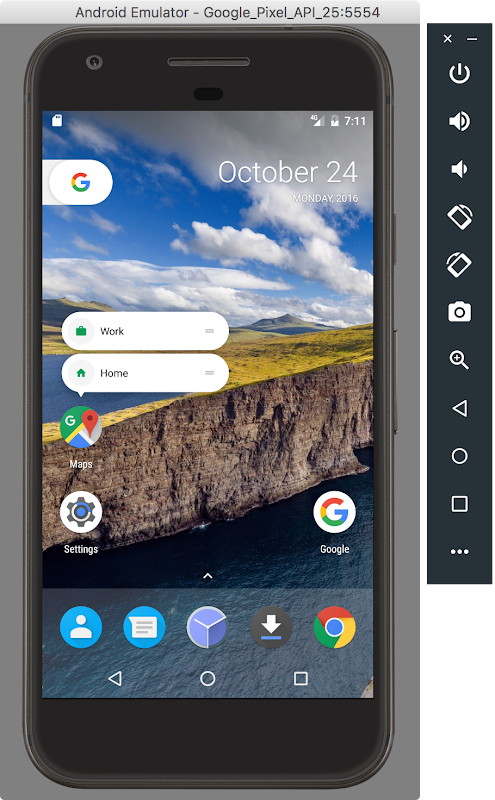
design guidelines. You can test your round icons on the Google APIs emulator
for API Level 25, which includes support for round icons and the new Google
Pixel Launcher.


Android Studio and the Google APIs emulator let you quickly create and test
your round icon assets.


If you're adding image keyboard support, you can use the Messenger and Google
Keyboard apps included in the preview system images for testing as they include
support for this new API.


Scale your tests using Firebase Test Lab for Android


To help scale your testing, make sure to take advantage of href="http://android-developers.blogspot.com/2016/11/android-dev-preview-in-firebase-test-lab.html">Firebase
Test Lab for Android and run your tests in the cloud at no charge during the
preview period on all virtual devices including the Developer Preview 2 (API
25). You can use the automated crawler (href="https://firebase.google.com/docs/test-lab/robo-ux-test">Robo Test) to
test your app without having to write any test scripts, or you can upload your
own instrumentation (e.g. Espresso) tests. You can upload your tests href="https://console.firebase.google.com/project/_/testlab/run">here.


Publish your apps to alpha, beta or production channels in Google
Play


After you've finished final testing, you can publish your updates compiled
against, and optionally targeting, API 25 to Google Play. You can publish to
your alpha, href="https://developer.android.com/distribute/engage/beta.html?utm_campaign=android_launch_npreview_061516&utm_source=anddev&utm_medium=blog">beta,
or even production channels in the Google Play Developer Console. In this way,
push your app updates to users whose devices are running Android 7.1, such as
Pixel and Android Beta devices.


Get Developer Preview 2 on Your Eligible Device


If you have an eligible device that's already enrolled in the href="https://android.com/beta">Android Beta Program, the device will get
the Developer Preview 2 update over the coming week. No action is needed on your
part. If you aren't yet enrolled in program, the easiest way to get started is
by visiting android.com/beta and opt-in
your eligible Android phone or tablet -- you'll soon receive this preview update
over-the-air. As always, you can also download and href="https://developer.android.com/preview/download.html?utm_campaign=android_launch_npreview_061516&utm_source=anddev&utm_medium=blog#flash">flash
this update manually.


As mentioned above, this Developer Preview update is available for Nexus 5X,
Nexus 6P, Nexus 9, and Pixel C devices.


We're expecting to launch the final release of the Android 7.1.1 in just a few
weeks Starting in December, we'll roll out Android 7.1.1 to the full lineup of
supported preview devices, as well as the recently launched Pixel and Pixel XL
devices. At that time, we'll also push the sources to AOSP, so our device
manufacturer partners can bring this new platform update to consumers on their
devices.


Meanwhile, we continue to welcome your feedback in the href="https://code.google.com/p/android/issues/list?can=1&q=label%3ADevPreview-N-7.1">Developer
Preview issue tracker, href="https://plus.google.com/communities/105153134372062985968/stream/755bb91d-c101-4e32-9277-1e560c4e26d2">N
Preview Developer community, or href="https://plus.google.com/communities/106765800802768335079">Android Beta
community as we work towards the final consumer release in December!


Pixel Security: Better, Faster, Stronger

Posted by Paul Crowley, Senior Software Engineer and Paul Lawrence, Senior Software Engineer


Encryption protects your data if your phone falls into someone else's hands. The
new Google Pixel and Pixel XL are encrypted by default to offer strong data
protection, while maintaining a great user experience with high I/O performance
and long battery life. In addition to encryption, the Pixel phones debuted
running the Android Nougat release, which has even more href="http://android-developers.blogspot.com/2016/09/security-enhancements-in-nougat.html">security
improvements.


This blog post covers the encryption implementation on Google Pixel devices and
how it improves the user experience, performance, and security of the device.


File-Based Encryption Direct Boot experience


One of the security features introduced in Android Nougat was href="https://source.android.com/security/encryption/file-based.html">file-based
encryption. File-based encryption (FBE) means different files are encrypted
with different keys that can be unlocked independently. FBE also separates data
into device encrypted (DE) data and credential encrypted (CE) data.


href="https://developer.android.com/training/articles/direct-boot.html">Direct
boot uses file-based encryption to allow a seamless user experience when a
device reboots by combining the unlock and decrypt screen. For users, this means
that applications like alarm clocks, accessibility settings, and phone calls are
available immediately after boot.


Enhanced with TrustZone® security


Modern processors provide a means to execute code in a mode that remains secure
even if the kernel is compromised. On ARM®-based processors this mode is known
as TrustZone. Starting in Android Nougat, all disk encryption keys are stored
encrypted with keys held by TrustZone software. This secures encrypted data in
two ways:


  • TrustZone enforces the href="https://source.android.com/security/verifiedboot/">Verified Boot
    process. If TrustZone detects that the operating system has been modified, it
    won't decrypt disk encryption keys; this helps to secure device encrypted (DE)
    data.
  • TrustZone enforces a waiting period between guesses at the user credential,
    which gets longer after a sequence of wrong guesses. With 1624 valid four-point
    patterns and TrustZone's ever-growing waiting period, trying all patterns would
    take more than four years. This improves security for all users, especially
    those who have a shorter and more easily guessed pattern, PIN, or
    password.


Encryption on Pixel phones


Protecting different folders with different keys required a distinct approach
from href="http://source.android.com/security/encryption/full-disk.html">full-disk
encryption (FDE). The natural choice for Linux-based systems is the
industry-standard eCryptFS. However, eCryptFS didn't meet our performance
requirements. Fortunately one of the eCryptFS creators, Michael Halcrow, worked
with the ext4 maintainer, Ted Ts'o, to add encryption natively to ext4, and
Android became the first consumer of this technology. ext4 encryption
performance is similar to full-disk encryption, which is as performant as a
software-only solution can be.


Additionally, Pixel phones have an inline hardware encryption engine, which
gives them the ability to write encrypted data at line speed to the flash
memory. To take advantage of this, we modified ext4 encryption to use this
hardware by adding a key reference to the bio structure, within the ext4 driver
before passing it to the block layer. (The bio structure is the basic container
for block I/O in the Linux kernel.) We then modified the inline encryption block
driver to pass this to the hardware. As with ext4 encryption, keys are managed
by the Linux keyring. To see our implementation, take a look at the href="https://android.googlesource.com/kernel/msm/+/android-msm-marlin-3.18-nougat-dr1/fs/ext4/crypto_key.c">source
code for the Pixel kernel.


While this specific implementation of file-based encryption using ext4 with
inline encryption benefits Pixel users, FBE is available in AOSP and ready to
use, along with the other features mentioned in this post.


Android Developer Stories: drupe and Noom expand globally by localising their apps on Google Play


Posted by Kacey Fahey, Marketing Programs Manager, Google Play


Interested in growing your app on a global scale? See how two app developers
localized their apps in unique ways to drive revenue and user engagement.


drupe


href="https://play.google.com/store/apps/details?id=mobi.drupe.app&hl=en&e=-EnableAppDetailsPageRedesign">drupe
is a communications app that utilizes the openness of android to build a truly
native experience delivering highly contextual recommendations to their users
across the world.


Key to achieving international growth, drupe has translated their app in 17
languages, and their store listing page in 28 languages. This led to an increase
in conversion and retention rates. Additionally, when entering India, the team
noticed several user reviews requesting integration with a specific messaging
app widely used in the Indian market. Through a combination of this integration,
adding Hindi language translation, and other new features, drupe saw improved
performance. In six months, daily active users increased 300%, and actions per
average daily user increased 25% in the Indian market.


Noom


href="https://play.google.com/store/apps/details?id=com.wsl.noom&hl=en&e=-EnableAppDetailsPageRedesign">Noom
is a health & fitness app that has achieved an 80% increase in international
revenue growth on Android over the past three years by localizing their app with
unique cultural behaviors, cuisines, and local-market coaches.


In addition to translating their app and store listing page, Noom conducted
extensive analysis to determine the right financial model tailored to each
international market. This included evaluation of their competitive landscape
and local health and wellness spending behavior, in addition to running pricing
experiments to determine the optimal offering between subscriptions, IAPs, or a
premium app.


Use the href="https://developer.android.com/distribute/tools/localization-checklist.html?utm_campaign=android_discussion_drupeandnoom_102016&utm_source=anddev&utm_medium=blog">Localization
Checklist to learn more about tailoring your app for different markets to
drive installs and revenue, and to create a better overall user experience.
Also, get the href="http://g.co/play/playbook-androiddevblogposts-evergreen">Playbook for
Developers app to stay up-to-date on new features and learn best practices
that will help you grow a successful business on Google Play.


Read the full articles for href="https://developer.android.com/distribute/stories/apps/drupe-communications.html?utm_campaign=android_discussion_drupeandnoom_102016&utm_source=anddev&utm_medium=blog">drupe
and href="https://developer.android.com/distribute/stories/apps/noom-health.html?utm_campaign=android_discussion_drupeandnoom_102016&utm_source=anddev&utm_medium=blog">Noom.


Now available: Android 7.1 Developer Preview


Posted by Dave Burke, VP of Engineering


A couple of weeks ago we announced that a developer preview of Android 7.1 Nougat was on the way. You can get started with this new release today by downloading the SDK and tools. To get the 7.1 release on your eligible device, enroll your device in the Android Beta program. If your device is already enrolled, you'll receive the update automatically.


What’s in the Developer Preview?


The Android 7.1 Developer Preview gives you everything you need to test your app on the new platform or extend it with new features like app shortcuts and image keyboard support. It includes an updated SDK and tools, documentation and samples, as well as emulators and device system images for running your apps on supported devices.


We’re continuing the model we used in N and earlier releases, and with Android 7.1 being an incremental release there are a few differences to highlight:


  • Since 7.1 has already launched on Pixel, we’re delivering the initial Developer Preview at beta quality for the Nexus lineup of devices. The goal is to tease out any device-specific issues.

  • We’ve finalized the new APIs as API Level 25

  • We’ve opened up publishing on Google Play for apps targeting the new API level, so you can update your apps soon as you are ready.


After the initial preview release, we plan to deliver an update in November followed by the final public release to the Android Open Source Project (AOSP) in December. Initially available on Nexus 5X, Nexus 6P, and Pixel C devices, we’ll extend the Developer Preview to other devices in November.


Get your apps ready for Android 7.1


To get started, update to Android Studio 2.2.2 and download API Level 25 platform, emulator system images and tools. The final API Level 25 SDK is available for download through the SDK Manager in Android Studio.


Once you’ve installed the API Level 25 SDK, you can update your project’s compileSdkVersion to 25 to build and test against the new APIs. If you’re doing compatibility testing, we recommend updating your app’s targetSdkVersion to 25 to test your app with compatibility behaviors disabled. For details on how to set up your app with the API Level 25 SDK, see Set up the Preview.


If you’re adding app shortcuts or circular launcher icons to your app, you can use Android Studio’s built-in Image Asset Studio to quickly help you create icons of different sizes that meet the material design guidelines.


The Google APIs Emulator System images shipped with the Android API Level 25 SDK include support for round icons and the new Google Pixel Launcher. The Google API system image allows you to test how your app’s circular app icons look in devices that support circular icons. Also, if you are developing live wallpapers, you can also use the the new system images with the Android Emulator to test the enhanced preview metadata in Android 7.1.


To help you add image keyboard support, you can use the Messenger and Google Keyboard apps included in the preview system images for testing as they include support for this new API.


Along with the API Level 25 SDK, we have also updated the Android Support Library to 25.0.0. The new version lets you add image keyboard support with compatibility back to API level 13. It also introduces BottomNavigationView widget, which implements the bottom navigation pattern from the material design guidelines.


For details on API Level 25 check out the API diffs and the updated API reference on the developer preview site.


Image keyboard support on Nexus 6P

You can use the Android Emulator in Android Studio to test your circular app icons & shortcuts in a launcher


App shortcuts on Nexus 6P

You can use the Image Asset tool to quickly create circular icon assets.


Publish your apps to alpha, beta or production channels in Google Play


Since the Android 7.1 APIs are final, you can publish updates compiling with, and optionally targeting, API 25 to Google Play. You can now publish app updates that use API 25 to your alpha, beta, or even production channels in the Google Play Developer Console. In this way, push your app updates to users whose devices are running Android 7.1, such as Pixel and Android Beta devices.

How to Get Android 7.1 Developer Preview on Your Eligible Device


If you are already enrolled in the Android Beta program, then your eligible enrolled devices will get the Android 7.1 Developer Preview update right away, no action is needed on your part. If you aren’t yet enrolled in Android Beta, the easiest way to get started is to visit android.com/beta and opt-in your eligible Android phone or tablet -- you’ll soon receive this (and later) preview updates over-the-air. If you have an enrolled device and do not want to receive the update, just visit Android Beta and unenroll the device. You can also download and flash this update manually.


We welcome your feedback in the Developer Preview issue tracker, N Preview Developer community, or Android Beta community as we work towards the consumer release in December!


Coming soon: Android 7.1 Developer Preview


Posted by Dave Burke, VP of Engineering


Today, we’re taking the wraps off of Android 7.1 Nougat, the latest version of the platform. You probably saw a sneak peek of it at last week’s event. It’s an incremental update based on Android 7.0 but includes new features for consumers and developers — from platform Daydream VR support and A/B system updates to app shortcuts and image keyboard support.


We’ve already been working closely with device makers to get them ready for Android 7.1, and next we’ll give you access to this update so you can start getting your apps ready.


Later this month we’ll be bringing you the Android 7.1 platform as an open Developer Preview, similar to what we did for Android 7.0. You’ll be able to test and build on the new platform and try the latest features.


As always, we’ll deliver the Developer Preview through the Android Beta program, which makes it incredibly easy to participate.


What’s in Android 7.1?


Android 7.1 delivers the productivity, security, and performance of Android 7.0, along with a variety of optimizations and bug fixes, features, and new APIs (API level 25).


For developers, Android 7.1 adds new capabilities to help you drive engagement in your app and deliver an improved user experience, such as:


  • App shortcuts API — lets you surface key actions directly in the launcher and take your users deep into your app instantly. You can create up to 5 shortcuts, either statically or dynamically.

  • Circular app icons support — lets you provide great-looking rounded icon resources that match the look of Pixel and other launchers.

  • Enhanced live wallpaper metadata — lets you provide metadata about your live wallpapers to any picker displaying the wallpapers as a preview. You can show existing metadata such as label, description, and author, as well as a new context URL and title to link to more information.


Android 7.1 also adds these much-requested developer features to the platform:


  • Image keyboard support — expands the types of content that users can enter from their keyboards, letting them express themselves through custom stickers, animated gifs, and more. Apps can tell the keyboard what types of content they accept, and keyboards can deliver all of the images and other content that they offer to the user. For broad compatibility, this API will also be available in the support library.

  • Storage manager Intent — lets an app take the user directly to a new Settings screen to clear unused files and free up storage space on the device.


For carriers and calling apps, the platform includes new APIs to support multi-endpoint calling and new telephony configuration options.


Image keyboard support on Nexus 6P

Image keyboard support: Let users input images and other content directly from a keyboard.


App shortcuts on Nexus 6P

App shortcuts: Use app shortcuts to surface key actions and take users deep into your app instantly.


Get your apps ready


Android 7.1 is an incremental release, but it’s always important to make sure your apps look and run great — especially as devices start to reach consumers.


The Android 7.1 Developer Preview will give you everything you need to test your apps or extend them with new features like shortcuts or keyboard images. Included are the SDK with new APIs, build tools, documentation and samples, as well as emulators and device system images for running your apps on supported Nexus devices. We’ll also include a launcher and apps that support app shortcuts, and a keyboard and apps that support keyboard images.


If you want to receive the Developer Preview automatically, visit Android Beta and enroll your device. If you previously enrolled a device and haven’t unenrolled, your device will receive the update. If you already enrolled but don’t want to receive the update, visit Android Beta to unenroll the device as soon as possible.


Initially, we’ll offer the Developer Preview for Nexus 5X, Nexus 6P, and Pixel C devices, extending to other supported devices by the end of the preview. At the final release of the Android 7.1.x platform, due in early December, we’ll roll out updates to the full lineup of supported devices — Nexus 6, 5X, 6P, 9, Player, Pixel C, and supported Android One devices — as well as Pixel and Pixel XL devices.


Coming to consumer devices soon


We’re working with our partners to bring Android 7.1 to devices in the ecosystem over the months ahead, so we recommend downloading the Android 7.1 Developer Preview as soon as it’s available. Test your apps for compatibility and optimize them to look their best, such as by providing circular app icons and adding app shortcuts.


Meanwhile, stay tuned, we’ll be sharing more details about the Developer Preview soon!


Extending Web Technology with Android


Developer guest post by Active Theory


Paper Planes started as a simple thought - “What if you could throw a
paper plane from one screen to another?”


The heart of our concept was to bring people together from all over the world,
using the power of the web - an instant connection to one another. Modern web
technology, specifically JavaScript and WebGL, powered the experience on every
screen.


href="https://play.google.com/store/apps/details?id=net.activetheory.paperplanes">Paper
Planes
was initially featured at Google I/O 2016, connecting attendees
and outside viewers for 30 minutes preceding the keynote. For the public launch
on International Peace Day 2016, we created an href="https://www.androidexperiments.com/experiment/paper-planes">Android
Experiment, which is also featured on href="https://play.google.com/store/apps/details?id=net.activetheory.paperplanes">Google
Play, to augment the existing web technology with native Android Nougat
features such as rich notifications when a plane is caught elsewhere in the
world.


Introduction


Users create and fold their own plane while adding a stamp that is pre-filled
with their location. A simple throwing gesture launches the plane into the
virtual world. Users visiting the desktop website would see their planes flying
into the screen.


Later, users can check back and see where their planes have been caught around
the world. Each stamp on the plane reads like a passport, and a 3D Earth
highlights flightpath and distance travelled.


In addition to making their own planes, users can gesture their phone like a net
to catch a plane that has been thrown from elsewhere and pinch to open it,
revealing where it has visited. Then they can add their own stamp, and throw it
back into the flock.


WebView


We developed Paper Planes to work across devices ranging from the 50-foot screen
on stage at Google I/O to desktop and mobile using the latest in web technology.


WebGL


From the stylized low-poly Earth to the flocking planes, WebGL is used to render
the 3D elements that power the experience. We wrote custom GLSL shaders to light
the Earth and morph targets to animate the paper as the user pinches to open or
close.


WebSockets


When a user “throws” a plane a message is sent over websockets to the back-end
servers where it is relayed to all desktop computers to visualize the plane
taking off.


WebWorkers


The plane flocking simulation is calculated across multiple threads using
WebWorkers that calculate the position of each plane and relay that information
back to the main thread to be rendered by WebGL.


To create an experience that works great across platforms, we extended the web
with native Android code. This enabled us to utilize the deep integration of
Chromium within Android to make the view layer of the application with the web
code that already existed, while adding deeper integration with the OS such as
rich notifications and background services.


If you’re interested in learning more about how to bridge WebView and Java code,
check
out this GitHub repo for a tutorial
.


Notifications


Firebase Cloud Messaging (FCM) was used to send push notifications to the
Android app. When a user’s plane has been caught and thrown by someone else, a
notification showing how many cities and miles it has travelled is sent to the
device of the plane’s creator via FCM. Outgoing notifications are managed to
ensure they are not sent too frequently to a device.


Background Service


We implemented a background service to run once a day which checks against local
storage to determine when a user last visited the app. If the user hasn’t
visited in over two weeks, the app sends a notification to invite the user back
into the app to create a new plane.


The Communication Network


Our application runs on a network of servers on Google Cloud Platform. We used
built-in geocoding headers to get approximate geographic locations for stamps
and Socket.IO to connect all devices over WebSockets.


Users connect to the server nearest them, which relays messages to a single main
server as well as to any desktop computers viewing the experience in that
region.


Moving forward


This approach worked extremely well for us, enabling an experience that was
smooth and captivating across platforms and form factors, connecting people from
all over the world. Extending the web with native capabilities has proven to be
a valuable avenue to deliver high quality experiences going forward. You can
learn even more on the href="https://www.androidexperiments.com/experiment/paper-planes">Android
Experiments website.


Google Play services 4.3

gps

Google Play services 4.3 has now been rolled out to the world, and it contains a number of features you can use to improve your apps. Specifically, this version adds some new members to the Google Play services family: Google Analytics API, Tag Manager, and the Address API. We’ve also made some great enhancements to the existing APIs; everything to make sure you stay on top of the app game out there.


Here are the highlights of the 4.3 release.


Google Analytics and Google Tag Manager

The Analytics API and Google Tag Manager has existed for Android for some time as standalone technologies, but with this release we are incorporating them as first class citizens in Google Play services. Those of you that are used to the API will find it very similar to previous versions, and if you have not used it before we strongly encourage you to take a look at it.

Google Analytics allows you to get detailed statistics on how you app is being used by your users, for example what functionality of your app is being used the most, or which activity triggers users to convert from an advertised version of an app to paid one. Google Tag Manager lets you change characteristics of your app on-the-fly, for example colors, without having to push an update from Google Play.


Google Play Games services Update

The furious speed of innovation in Android mobile gaming has not slowed down and neither have we when it comes to packing the Google Play Game services API with features.

With this release, we are introducing game gifts, which allows players to send virtual in-game requests to anyone in their Google+ circles or through player search. Using this feature, the player can send a 'wish' request to ask another player for an in-game item or benefit, or a 'gift' request to grant an item or benefit to another player.

This is a great way for a game to be more engaging by increasing cross player collaboration and social connections. We are therefore glad to add this functionality as an inherent part of the Games API, it is an much-wanted extension to the multi-player functionality included a couple of releases ago. For more information, see: Unlocking the power of Google for your games.


Drive API

The Google Drive for Android API was just recently added as a member of the Google Play services API family. This release adds a number of important features:

  • Pinning - You can now pin files that should be kept up to date locally, ensuring that it is available when the user is offline. This is great for users that need to use your app with limited or no connectivity


  • App Folders - An app often needs to create files which are not visible to the user, for example to store temporary files in a photo editor. This can now be done using App Folders, a feature is analogous to Application Data Folders in the Google Drive API


  • Change Notifications - You can now register a callback to receive notifications when a file or folder is changed. This mean you no longer need to query Drive continuously to check if the data has changed, just put a change notification on it


In addition to the above, we've also added the ability to access a number of new metadata fields.


Address API

This release will also includes a new Address API, which allows developers to request access to addresses for example to fill out a delivery address form. The kicker is the convenience for the user; a user interface component is presented where they select the desired address, and bang, the entire form is filled out. Developers have been relying on Location data which works very well, but this API shall cater for cases where the Location data is either not accurate or the user actually wants to use a different address than their current physical location. This should sound great to anyone who has done any online shopping during the last decade or so.


That’s it for this time. Now go to work and incorporate these new features to make your apps even better!

And stay tuned for future updates.


For the release video, please see:

DevBytes: Google Play Services 4.3


For details on the APIs, please see:

Google Analytics

Google Tag Manager

Google Play Games services Gifts

Google Drive Android API - Change Events

Google Drive Android API - Pinning

Google Drive Android API - App Folder

Address API


Some SecureRandom Thoughts


The Android security team has been investigating the root cause of the compromise of a bitcoin transaction that led to the update of multiple Bitcoin applications on August 11.


We have now determined that applications which use the Java Cryptography Architecture (JCA) for key generation, signing, or random number generation may not receive cryptographically strong values on Android devices due to improper initialization of the underlying PRNG. Applications that directly invoke the system-provided OpenSSL PRNG without explicit initialization on Android are also affected. Applications that establish TLS/SSL connections using the HttpClient and java.net classes are not affected as those classes do seed the OpenSSL PRNG with values from /dev/urandom.


Developers who use JCA for key generation, signing or random number generation should update their applications to explicitly initialize the PRNG with entropy from /dev/urandom or /dev/random. A suggested implementation is provided at the end of this blog post. Also, developers should evaluate whether to regenerate cryptographic keys or other random values previously generated using JCA APIs such as SecureRandom, KeyGenerator, KeyPairGenerator, KeyAgreement, and Signature.


In addition to this developer recommendation, Android has developed patches that ensure that Android’s OpenSSL PRNG is initialized correctly. Those patches have been provided to OHA partners.


We would like to thank Soo Hyeon Kim, Daewan Han of ETRI and Dong Hoon Lee of Korea University who notified Google about the improper initialization of OpenSSL PRNG.


Update: the original code sample below crashed on a small fraction of Android devices due to /dev/urandom not being writable. We have now updated the code sample to handle this case gracefully.


/*
* This software is provided 'as-is', without any express or implied
* warranty. In no event will Google be held liable for any damages
* arising from the use of this software.
*
* Permission is granted to anyone to use this software for any purpose,
* including commercial applications, and to alter it and redistribute it
* freely, as long as the origin is not misrepresented.
*/

import android.os.Build;
import android.os.Process;
import android.util.Log;

import java.io.ByteArrayOutputStream;
import java.io.DataInputStream;
import java.io.DataOutputStream;
import java.io.File;
import java.io.FileInputStream;
import java.io.FileOutputStream;
import java.io.IOException;
import java.io.OutputStream;
import java.io.UnsupportedEncodingException;
import java.security.NoSuchAlgorithmException;
import java.security.Provider;
import java.security.SecureRandom;
import java.security.SecureRandomSpi;
import java.security.Security;

/**
* Fixes for the output of the default PRNG having low entropy.
*
* The fixes need to be applied via {@link #apply()} before any use of Java
* Cryptography Architecture primitives. A good place to invoke them is in the
* application's {@code onCreate}.
*/
public final class PRNGFixes {

private static final int VERSION_CODE_JELLY_BEAN = 16;
private static final int VERSION_CODE_JELLY_BEAN_MR2 = 18;
private static final byte[] BUILD_FINGERPRINT_AND_DEVICE_SERIAL =
getBuildFingerprintAndDeviceSerial();

/** Hidden constructor to prevent instantiation. */
private PRNGFixes() {}

/**
* Applies all fixes.
*
* @throws SecurityException if a fix is needed but could not be applied.
*/
public static void apply() {
applyOpenSSLFix();
installLinuxPRNGSecureRandom();
}

/**
* Applies the fix for OpenSSL PRNG having low entropy. Does nothing if the
* fix is not needed.
*
* @throws SecurityException if the fix is needed but could not be applied.
*/
private static void applyOpenSSLFix() throws SecurityException {
if ((Build.VERSION.SDK_INT < VERSION_CODE_JELLY_BEAN)
|| (Build.VERSION.SDK_INT > VERSION_CODE_JELLY_BEAN_MR2)) {
// No need to apply the fix
return;
}

try {
// Mix in the device- and invocation-specific seed.
Class.forName("org.apache.harmony.xnet.provider.jsse.NativeCrypto")
.getMethod("RAND_seed", byte[].class)
.invoke(null, generateSeed());

// Mix output of Linux PRNG into OpenSSL's PRNG
int bytesRead = (Integer) Class.forName(
"org.apache.harmony.xnet.provider.jsse.NativeCrypto")
.getMethod("RAND_load_file", String.class, long.class)
.invoke(null, "/dev/urandom", 1024);
if (bytesRead != 1024) {
throw new IOException(
"Unexpected number of bytes read from Linux PRNG: "
+ bytesRead);
}
} catch (Exception e) {
throw new SecurityException("Failed to seed OpenSSL PRNG", e);
}
}

/**
* Installs a Linux PRNG-backed {@code SecureRandom} implementation as the
* default. Does nothing if the implementation is already the default or if
* there is not need to install the implementation.
*
* @throws SecurityException if the fix is needed but could not be applied.
*/
private static void installLinuxPRNGSecureRandom()
throws SecurityException {
if (Build.VERSION.SDK_INT > VERSION_CODE_JELLY_BEAN_MR2) {
// No need to apply the fix
return;
}

// Install a Linux PRNG-based SecureRandom implementation as the
// default, if not yet installed.
Provider[] secureRandomProviders =
Security.getProviders("SecureRandom.SHA1PRNG");
if ((secureRandomProviders == null)
|| (secureRandomProviders.length < 1)
|| (!LinuxPRNGSecureRandomProvider.class.equals(
secureRandomProviders[0].getClass()))) {
Security.insertProviderAt(new LinuxPRNGSecureRandomProvider(), 1);
}

// Assert that new SecureRandom() and
// SecureRandom.getInstance("SHA1PRNG") return a SecureRandom backed
// by the Linux PRNG-based SecureRandom implementation.
SecureRandom rng1 = new SecureRandom();
if (!LinuxPRNGSecureRandomProvider.class.equals(
rng1.getProvider().getClass())) {
throw new SecurityException(
"new SecureRandom() backed by wrong Provider: "
+ rng1.getProvider().getClass());
}

SecureRandom rng2;
try {
rng2 = SecureRandom.getInstance("SHA1PRNG");
} catch (NoSuchAlgorithmException e) {
throw new SecurityException("SHA1PRNG not available", e);
}
if (!LinuxPRNGSecureRandomProvider.class.equals(
rng2.getProvider().getClass())) {
throw new SecurityException(
"SecureRandom.getInstance(\"SHA1PRNG\") backed by wrong"
+ " Provider: " + rng2.getProvider().getClass());
}
}

/**
* {@code Provider} of {@code SecureRandom} engines which pass through
* all requests to the Linux PRNG.
*/
private static class LinuxPRNGSecureRandomProvider extends Provider {

public LinuxPRNGSecureRandomProvider() {
super("LinuxPRNG",
1.0,
"A Linux-specific random number provider that uses"
+ " /dev/urandom");
// Although /dev/urandom is not a SHA-1 PRNG, some apps
// explicitly request a SHA1PRNG SecureRandom and we thus need to
// prevent them from getting the default implementation whose output
// may have low entropy.
put("SecureRandom.SHA1PRNG", LinuxPRNGSecureRandom.class.getName());
put("SecureRandom.SHA1PRNG ImplementedIn", "Software");
}
}

/**
* {@link SecureRandomSpi} which passes all requests to the Linux PRNG
* ({@code /dev/urandom}).
*/
public static class LinuxPRNGSecureRandom extends SecureRandomSpi {

/*
* IMPLEMENTATION NOTE: Requests to generate bytes and to mix in a seed
* are passed through to the Linux PRNG (/dev/urandom). Instances of
* this class seed themselves by mixing in the current time, PID, UID,
* build fingerprint, and hardware serial number (where available) into
* Linux PRNG.
*
* Concurrency: Read requests to the underlying Linux PRNG are
* serialized (on sLock) to ensure that multiple threads do not get
* duplicated PRNG output.
*/

private static final File URANDOM_FILE = new File("/dev/urandom");

private static final Object sLock = new Object();

/**
* Input stream for reading from Linux PRNG or {@code null} if not yet
* opened.
*
* @GuardedBy("sLock")
*/
private static DataInputStream sUrandomIn;

/**
* Output stream for writing to Linux PRNG or {@code null} if not yet
* opened.
*
* @GuardedBy("sLock")
*/
private static OutputStream sUrandomOut;

/**
* Whether this engine instance has been seeded. This is needed because
* each instance needs to seed itself if the client does not explicitly
* seed it.
*/
private boolean mSeeded;

@Override
protected void engineSetSeed(byte[] bytes) {
try {
OutputStream out;
synchronized (sLock) {
out = getUrandomOutputStream();
}
out.write(bytes);
out.flush();
} catch (IOException e) {
// On a small fraction of devices /dev/urandom is not writable.
// Log and ignore.
Log.w(PRNGFixes.class.getSimpleName(),
"Failed to mix seed into " + URANDOM_FILE);
} finally {
mSeeded = true;
}
}

@Override
protected void engineNextBytes(byte[] bytes) {
if (!mSeeded) {
// Mix in the device- and invocation-specific seed.
engineSetSeed(generateSeed());
}

try {
DataInputStream in;
synchronized (sLock) {
in = getUrandomInputStream();
}
synchronized (in) {
in.readFully(bytes);
}
} catch (IOException e) {
throw new SecurityException(
"Failed to read from " + URANDOM_FILE, e);
}
}

@Override
protected byte[] engineGenerateSeed(int size) {
byte[] seed = new byte[size];
engineNextBytes(seed);
return seed;
}

private DataInputStream getUrandomInputStream() {
synchronized (sLock) {
if (sUrandomIn == null) {
// NOTE: Consider inserting a BufferedInputStream between
// DataInputStream and FileInputStream if you need higher
// PRNG output performance and can live with future PRNG
// output being pulled into this process prematurely.
try {
sUrandomIn = new DataInputStream(
new FileInputStream(URANDOM_FILE));
} catch (IOException e) {
throw new SecurityException("Failed to open "
+ URANDOM_FILE + " for reading", e);
}
}
return sUrandomIn;
}
}

private OutputStream getUrandomOutputStream() throws IOException {
synchronized (sLock) {
if (sUrandomOut == null) {
sUrandomOut = new FileOutputStream(URANDOM_FILE);
}
return sUrandomOut;
}
}
}

/**
* Generates a device- and invocation-specific seed to be mixed into the
* Linux PRNG.
*/
private static byte[] generateSeed() {
try {
ByteArrayOutputStream seedBuffer = new ByteArrayOutputStream();
DataOutputStream seedBufferOut =
new DataOutputStream(seedBuffer);
seedBufferOut.writeLong(System.currentTimeMillis());
seedBufferOut.writeLong(System.nanoTime());
seedBufferOut.writeInt(Process.myPid());
seedBufferOut.writeInt(Process.myUid());
seedBufferOut.write(BUILD_FINGERPRINT_AND_DEVICE_SERIAL);
seedBufferOut.close();
return seedBuffer.toByteArray();
} catch (IOException e) {
throw new SecurityException("Failed to generate seed", e);
}
}

/**
* Gets the hardware serial number of this device.
*
* @return serial number or {@code null} if not available.
*/
private static String getDeviceSerialNumber() {
// We're using the Reflection API because Build.SERIAL is only available
// since API Level 9 (Gingerbread, Android 2.3).
try {
return (String) Build.class.getField("SERIAL").get(null);
} catch (Exception ignored) {
return null;
}
}

private static byte[] getBuildFingerprintAndDeviceSerial() {
StringBuilder result = new StringBuilder();
String fingerprint = Build.FINGERPRINT;
if (fingerprint != null) {
result.append(fingerprint);
}
String serial = getDeviceSerialNumber();
if (serial != null) {
result.append(serial);
}
try {
return result.toString().getBytes("UTF-8");
} catch (UnsupportedEncodingException e) {
throw new RuntimeException("UTF-8 encoding not supported");
}
}
}

Android at Google I/O 2013: Keynote Wrapup


The last year has been an exciting one for Android developers, with an incredible amount of momentum. In fact, over 48 billion apps have been downloaded from Google Play to date, with over 2.5 billion app downloads in the last month alone.


This week, at Google I/O, our annual developer conference, we’re celebrating this momentum, and putting on stage a number of new features and advancements both for the Android platform and Google Play, to help you design, develop and distribute great apps to your users.


We just wrapped up the keynote, and wanted to share a number of those new features; we’ll be spotlighting some of them throughout the week both here, on Google+, and in 36 Android sessions and sandboxes at the Moscone center in San Francisco (with many of the sessions livestreamed at developer.google.com). Enjoy!


Google Play Services 3.1


Google Play Services is our platform for bringing you easier integration with Google products and new capabilities to use in your apps. Today we announced a new version of Google Play Services that has some great APIs for developers.


  • Google Play games services give you great new social features that you can add to your games   achievements, leaderboards, cloud save, and real-time multiplayer

  • Location APIs make it easy to add location- and context-awareness to your apps through a fused location provider, geofencing, and activity recognition

  • Google Cloud Messaging enhancements let you use bidirectional XMPP messaging between server and devices and dismiss notifications

  • Cross-Platform Single Sign On, which lets your users sign in once, for all of their devices using Google+ Sign-In.


Android Studio: A new IDE for Android development


Today we announced a new Integrated Development Environment (IDE) built just for Android, with the needs of Android developers in mind. It’s called Android Studio, it’s free, and it’s available now to try as an early access preview.


To build Android Studio, we worked with with JetBrains, creators of one of the most advanced Java IDEs available today. Based on the powerful, extensible IntelliJ IDEA Community Edition, we've added features and capabilities that are designed specifically for Android development, to simplify and optimize your daily workflow for creating Android apps.


Google Play Developer Console: a better distribution experience


Building awesome Android apps is only part of the story. Today we announced great new features in the Google Play Developer Console that give you more control over how you distribute your app and insight into how your app is doing:


  • App translation service: a pilot program that lets you purchase professional translations for your app directly from the Developer Console.

  • Revenue graphs: a new tab in the Developer Console gives you a summary of your app global app revenue over time.

  • Alpha and beta testing and staged rollouts: you can now distribute your app to controlled alpha and beta test groups, or do staged rollouts to specific percentages of your userbase.

  • Optimization tips: design your app for tablets and understand how to expand your app into new language markets.

  • Google Analytics: launching later this summer, your Google Analytics usage stats will be viewable right in the Developer Console.

  • Referral tracking: also launching later this summer, you’ll get a new report in Google Analytics to show what blogs, campaigns, and ads are driving your installs.


Follow the Android Sessions


Join us for the Android sessions today and through the week by livestream. Visit the I/O Live Stream schedule for details.

Google Keep--Save what’s on your mind

Every day we all see, hear or think of things we need to remember. Usually we grab a pad of sticky-notes, scribble a reminder and put it on the desk, the fridge or the relevant page of a magazine. Unfortunately, if you’re like me you probably often discover that the desk, fridge or magazine wasn’t such a clever place to leave the note after all...it’s rarely where you need it when you need it.

To solve this problem we’ve created Google Keep. With Keep you can quickly jot ideas down when you think of them and even include checklists and photos to keep track of what’s important to you. Your notes are safely stored in Google Drive and synced to all your devices so you can always have them at hand.

If it’s more convenient to speak than to type that’s fine—Keep transcribes voice memos for you automatically. There’s super-fast search to find what you’re looking for and when you’re finished with a note you can archive or delete it.


Changing priorities isn’t a problem: just open Keep on your Android phone or tablet (there’s a widget so you can have Keep front and center all the time) and drag your notes around to reflect what matters. You can choose the color for each note too.

Pro tip: for adding thoughts quickly without unlocking your device there's a lock screen widget (on devices running Android 4.2+).


Google Keep is available on Google Play for devices running Android 4.0, Ice Cream Sandwich and above. You can access, edit and create new notes on the web at http://drive.google.com/keep and in the coming weeks you'll be able to do the same directly from Google Drive.

Posted by Katherine Kuan, Software Engineer